Product Images
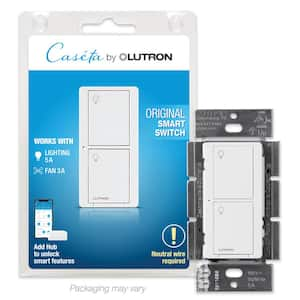
Caseta 3-Way Smart Light Switch Kit for All Light Bulbs or Fans, 5A/Neutral Wire Required, White (P-PKG1WS-WH-R)

- Remote control lights from anywhere in your home
- Set outdoor light schedules at dusk and automatically off
- Compatible w/ Alexa, Apple HomeKit or Google Assistant
- View More Details
Free & Easy Returns In Store
Return this item within 90 days of purchase.
Ask about this product
Get an answer now with AI
Magic Apron Assistant is an AI virtual assistant. By proceeding, you consent to the recording and use of your information by The Home Depot (and authorized third parties). More information
Product Details
About This Product
Ensure you and your family always enter a well-lit home. Use the smart switch to set your front porch lights to turn on at dusk, ensuring your home is not dark when you return. Create schedules to turn lights on and off at set times to best fit your everyday routines and activate custom lighting scenes with just the touch of a button. Schedule your outdoor lights to turn on every night, as the sun sets - even when the seasons change and you gain or lose an hour. The geofencing feature allows you to never have to worry that you forgot to turn off the lights - set your lights to instantly turn off the minute you leave your home. (Smart bridge required for schedules and geofencing.) Caseta allows you to control your lights, your way - use the free app, your voice (voice assistant and smart bridge required), the wireless Pico remote, or the switch at the wall itself. The smart switch also allows you to control multiple styles of bulbs at once - control your deck and patio lights all at once to transform your outdoor living space for your family and guests. For added convenience, use your smart switch with the included wireless Pico remote to turn your lights on or off with the simple touch of a button from anywhere in your home. Add an extra point of control and mount your Pico to virtually any surface with the included Pico wall mount bracket, no cutting holes or pulling wire required. Neutral wire required.
Highlights
- Peace of mind: set outdoor lights to turn on at dusk, so your family can return to a well-lit home (caseta smart hub, l-bdg2-wh, required)
- Most connected: caseta connects with more leading smart home devices - including alexa, apple home kit, the google assistant, ring, serena shades and sonos - than any other smart lighting control brand (caseta smart hub required)
- Outdoor entertaining: transform your outdoor living space for family and guests by controlling patio/deck lights, create schedules to turn lights on/off at set times to best fit routines; activate scenes with the touch of a button (caseta smart hub required)
- Sunset tracker: schedule outdoor lights to turn on every night as the sun sets - even when the seasons change and you gain or lose an hour
- Smart 3-way control: place remote over existing electrical box with included bracket or add a new point of control anywhere in the home, without cutting holes or pulling wire
- Geofencing: smart lighting that knows when you come and go - get an alert when you head out indicating you've left the lights on or automatically set lights to turn off - all based on your location
- Control your way: caseta puts the smarts in the switch so you can control your lights a variety of ways - via your smartphone, your voice, included wireless remote or directly from the switch
- Get more, spend less: 1-caseta smart switch can control many bulbs at once; make many bulbs smart, even your existing bulbs, get smart control of multiple styles of led, incandescent and halogen bulbs
- Technical details: works with up to 600w incandescent/halogen/elv/mlv, 5-amps of led/cfl or 3-amps of ceiling or exhaust fans, neutral wire required for switch
- Includes: (1) Lutron caseta smart switch, (1) wireless pico remote, (1) wall plate adapter and (1) wall plate; neutral wire required
- Click here for more information on Electronic Recycling Programs
- Return Policy
Product Information
Specifications
Dimensions: H 4.9 in, W 2.3 in, D 2.3 in
Dimensions
Product Depth (in.) | 2.3 in |
|---|---|
Product Height (in.) | 4.9 in |
Product Width (in.) | 2.3 in |
Details
Amperage (A) | 5 A |
|---|---|
Circuit Connection | 3-Way, Multi-Location, Single Pole |
Color Family | White |
Color/Finish | White |
Compatible Bulb Type | CFL, Halogen, Incandescent, LED |
Control Function | Light |
Control Style | Push Button |
Features | Programmable |
Finish Type | Gloss |
Hub Required | Lutron Bridge Hub |
Material | Resin |
Package Quantity | 1 |
Power Options | Hardwired |
Requires Hub? | Hub Required for Remote Access |
Returnable | 90-Day |
Smart Home | Smart Home Enabled |
Smart Home Protocol | Clear Connect |
Voice Control Hub Required | Alexa via Proprietary Bridge/Gateway Google Assistant via Proprietary Bridge/Gateway Siri via Proprietary App |
Voltage (V) | 120 V |
Wall Plate Included | With Wall Plate |
Wattage (W) | 150 W |
Works With | Alexa, Apple HomeKit, Google, Google Assistant, Lutron, Ring, Samsung SmartThings, Siri |
Warranty / Certifications
Certifications and Listings | UL Listed |
|---|---|
Manufacturer Warranty | 1 Year |
Questions & Answers
How far in feet can the 2 Nd be from the first
Bert, Thank you for your interest in Lutron products! For best performance, we recommend keeping the Pico remote within 30 feet of the switch, even through standard construction materials. If you have any further questions, please feel free to contact our 24/7 Technical Support Team at 1-888-LUTRON1 (588-7661) or email us at support@lutron.com Amy @ Lutron
Will this switch work as a 4way switch seeing that I have already 2-3 ways, I want to control the light from a 3rd. Location
Rono, Thank you for your interest in Lutron for your lighting needs! Yes, you can replace two existing switches to maintain 3-way setup. Or in your application, you can turn it into a multi-location set up. The wired switch (PD-5ANS) will replace one of the existing 3-way switches. The second 3-way switch can remain with a small wiring adjustment. Then, the Pico remote can be paired to provide control from a third location converting this to a multi-location set up. If you have any further questions or need help with wiring, please feel free to contact our 24/7 Technical Support Team at 1-888-Lutron1 (588-7661) or email us at support@lutron.com Amy @ Lutron Support
Will this work with a camera flood light combo?
Yes, the Caseta PD‑5ANS can power most camera floodlight combos, but it’s not ideal for practical use. While the switch supports up to 5A of lighting loads, which covers typical floodlight camera power requirements, turning the PD‑5ANS off also cuts power to the camera, disabling motion detection, recording, and notifications. Unless your combo will have separate feeds to power the camera and the lights, we would follow the recommendation on most of these combos and hard-wire the floodlight. We hope this helps! If you have further questions, please feel free to contact our 24/7 support team directly at 1-844-LUTRON1 or by emailing us at support@lutron.com
Does it come in light almond
Hello! Thank you for your question. The devices themselves are available in different colors, light almond among them, but the kit or package is only available in white. If you would like to discuss this in more detail, we have representatives available 24/7 and would be happy to help. Feel free to reach out to us anytime at 844-LUTRON1.
Does this switch work on a low voltage system
Hello James. This will depend on the low voltage system. We would like to hear more from you about your application to see how we can help. Please reach out to our Technical Support Team at support@lutron.com or give us a call at 1-844-LUTRON1. We're here 24/7, so call us any time!
My apt. has 7 sets of Lutron 3-way dimmers, & 5 single. I want to change to smart switches and add a smart fan/light switch. I like the rocker look, not the Pico. What do I need to order? All switches have neutrals, and the wires are connected.
Hello! Thanks for inquiring. Lutron does not currently manufacture a smart dual fan/light control; our apologies. We recommend controlling both the fan and light with the Claro Smart switch model DVRF-5NS. For independent fan/light control, the fan motor and lighting load must have their own controls. Then, the Caseta Fan Speed Control model PD-FSQN can be used on the fan motor, and the Original Smart dimmer model PD-6WCL can be used on the fan light.
Can smart switching control fans
Hi Kurt, Thank you for considering Lutron for your lighting solutions! Yes, you can absolutely use Caséta Smart devices to control fans. The PD-5ANS can control fans up to 3 amps, while the PD-FSQN is designed for single pull-chain ceiling fans with a 1.5-amp or lower AC motor and no built-in remote or control module. Hope this helps! If you have any further questions, please feel free to contact our 24/7 Technical Support Team @ 1-888-Lutron1 (588-7661) or email us at support@lutron.com. Amy @ Lutron
We have a bathroom that currently has a "double" / Combination switch (like an outlet unit but a switch in place of the outlets). We would like to place this type of unit in the bathroom as the current "double" switch is just inconvenient to find and use
Hello! Yes, you can combine both loads onto the PD-5ANS. However, please ensure that they do not exceed the load capacity of the control. Please refer to the load capacity chart on page 4: https://assets.lutron.com/a/documents/369987_eng.pdf
Viewing 1-8 of 53
Customer Reviews
4.7 out of 5
5
201
4
17
3
7
2
4
1
8

Loading Recommendations
Related Products

Claro Smart Rocker Switch 3-Way Kit w/Pico Paddle Remote, 5 Amp/Neutral Required in White (DVRF-PKG1S-WH)
Introducing the Claro smart switch for Caseta smart lighting. Lutron's most popular switch design is now smart and works with your existing Caseta products. Match existing paddle-style switch in your home with the same elegant, recognized aesthetic on both the switch and the Pico paddle remote. With the Pico paddle remote, add an additional point of control wirelessly, without needing a hub or password. Add the Caseta smart hub later to unlock advanced features such as scenes, scheduling, app control, and connectivity to Alexa, Apple Home, Google Home, Ring, Sonos, and more. Mounting the Pico remote to the wall with the included Pico wallmount bracket makes the Pico remote look and feel like a new switch, without cutting holes and pulling wire normally required for installation. The Claro smart switch is ideal for areas where dimming is not needed, such as garages, hallways, or outdoor porch lights. The Claro smart switch features a soft glow LED indicator light that brightens when your lights are activated. Kit includes (1) Claro smart switch for Caseta smart lighting, (1) Pico paddle remote, (1) wallmount bracket, and 1) coordinating wallplate. Claro smart switch works with 5A LED lights or 3A fans; neutral wire required for operation.
Caseta Smart Switch for All Bulb Types or Fans, 6A, Neutral Wire Required, White (PD-6ANS-WH)
Experience the ultimate convenience in lighting control with Lutron's family of Caseta dimmers, switches, and smart phone control. The Caseta by Lutron In-Wall Switch provides switching of multiple load types and, when paired with Pico remote controls, allows remote control from anywhere in the space. Use the Pico remote control either in your hand, on a tabletop pedestal or by mounting the remote directly to the wall (remote control and accessories sold separately). You can even use the Pico remote to control the lights from your car as you arrive home. This switch works with up to 720-Watt of incandescent, halogen, ELV and MLV, 6 Amp of dimmable LED/CFL and 3.6 Amp of general purpose fans. Neutral wire required. Coordinating wall plate sold separately.

Caseta Smart Lighting On/Off Switch and Remote Kit for All Bulb/Fans, 5A, Neutral Wire Required, White (PD5ANS-2BPICO)
Experience the ultimate convenience in lighting control with Lutron's family of Caseta Wireless dimmers, switches and smart phone control. The Caseta Wireless In-Wall Switch provides switching of multiple load types and, when paired with the included Pico remote control, wirelessly control your lights or fan from anywhere in the home. Use the included Pico remote control as a hand-held remote, attach to almost any wall surface for 3-way control or use with a tabletop pedestal (PICO-WBX-ADAPT, Pedestal and wallplate sold separately). You can even use the Pico remote to control the lights from your car as you arrive home. This switch works with up to 720-Watt of incandescent, halogen, ELV and MLV, 6 Amp of dimmable LED/CFL and 3.6 Amp of general purpose fans. Neutral wire required. Coordinating wall plate sold separately.

Caseta Smart Switch for All Bulb Types or Fans, 5A, Neutral Wire Required, White (PD-5ANS-WH-R-2) (2-Pack)
Experience the ultimate convenience in lighting control with Lutron's family of Caseta Wireless dimmers, switches and smart phone control. The Caseta Wireless In-Wall Switch provides switching of multiple load types and, when paired with Pico remote controls, allows remote control from anywhere in the space. Use the Pico remote control either in your hand, on a tabletop pedestal or by mounting the remote directly to the wall (remote control and accessories sold separately). You can even use the Pico remote to control the lights from your car as you arrive home. This switch works with up to 600-Watt of incandescent, halogen, ELV and MLV, 5 amps of LED/CFL and 3.0 amps of general purpose fans. Neutral wire required. Coordinating wall plate sold separately.