Product Images
Top Rated
Outdoor Wi-Fi Cam with Motion Activated Floodlight, White

- Hardwired outdoor security camera with 1080p HD Video
- Two LED floodlights, security siren & advanced motion detection
- Two-way talk, mobile notifications, customizable motion zones
- View More Details
Free & Easy Returns In Store
Return this item within 90 days of purchase.
Ask about this product
Get an answer now with AI
Magic Apron Assistant is an AI virtual assistant. By proceeding, you consent to the recording and use of your information by The Home Depot (and authorized third parties). More information
Product Details
About This Product
Ring Floodlight Cam is the first HD security camera with built-in floodlights, two-way talk and a siren alarm. Floodlight Cam shines the lights and starts recording as soon as motion is detected. And you'll also get an alert on your phone and tablet to let you know that someone's at your home. When you answer the alert, you can see, hear and speak to people on your property from anywhere. Floodlight Cam connects to standard junction boxes and easily replaces existing wired floodlights. It also comes with a free 30-day trial of Ring Protect Plus, so you can review, save and share all your Ring videos at anytime, with anyone.
Highlights
- Watch over your home in 1080p HD video and check in at anytime with Live View.
- Requires hardwired installation for around-the-clock power and peace of mind.
- Hear and speak to people on your property with two-way talk.
- Get real-time notifications whenever motion is detected.
- Eliminate blindspots or dark areas with built-in night vision and two LED Floodlights.
- Sound the security alarm on suspicious activity.
- Customize your motion sensors to focus on important areas in your yard.
- Save and share video and photos with an optional Ring Protect Plan (subscription sold separately).
- Works With Alexa so you can hear audio announcements when motion is detected.

- Click here for more information on Electronic Recycling Programs
- Return Policy
Product Information
Additional Resources
Shop All RingSpecifications
Dimensions: H 7 in, W 11 in, D 8.25 in
Dimensions
Product Depth (in.) | 8.25 in |
|---|---|
Product Height (in.) | 7 in |
Product Width (in.) | 11 in |
Details
Cable Connection | WiFi |
|---|---|
Camera Connection | Wireless Cameras |
Camera Resolution | 1080p |
Camera Technology | IP |
Camera Type | Bullet |
Color/Finish | White |
Features | Audio Alert/Siren, Built-in Speaker, Microphone, Motion Sensor, Wall Mountable |
Field of View | 180 Degrees |
Image Sensor Type | CMOS |
Included | No Additional Items Included |
Indoor/Outdoor | Outdoor |
Night Vision Distance (ft.) | 30 |
Pack Size | 1 |
Power Options | Hardwired |
Recording Storage | Cloud |
Remote Access | Remote Access |
Requires Hub? | No Hub Required |
Returnable | 90-Day |
Smart Home | Smart Home Enabled |
Smart Home Protocol | Wi-Fi |
Video Signal | Digital |
Voice Control Hub Required | No Voice Control |
Works With | ADT Pulse, Alexa, Ring |
Warranty / Certifications
Manufacturer Warranty | 1-year limited warranty and service included |
|---|
Questions & Answers
Where is the QR code located?
Hi JKee. Thank you for reaching out to us with your question. You can locate the QR code on the back of the device. If you can’t find the QR code, tap the help icon (?), and select your device model to help you locate the QR code. If the QR code doesn’t scan, tap Other Options and try scanning the barcode, or enter the PIN located below the QR code. We invite you to reach out to our community if any additional information is needed regarding your question. The Ring Community is our first peer-to-peer community forum, giving our customers the ability to help one another by sharing their feedback and experiences with each other. You can find it here: https://community.ring.com/. Thank you, Amilia from Ring.
what does "lifetime purchase protection" mean and how long will this product last (what is it's average longevity- I live in Utah
Hello Laura, All our devices do come with a limited one-year warranty, in which Ring will repair or replace any Ring products that malfunction due to defective parts or workmanship, at no charge to you. There is also an extended warranty available through our Ring Protect Plus Plan option. For extended warranty coverage to apply to your Ring device, the device must be within its original warranty period when you subscribe to Ring Protect Plus plan. Once the original warranty expires, the device will be covered under Ring Protect Plus plan until you discontinue your subscription. Non-Ring and other third-party devices are not eligible for the extended warranty. Ring Community launched in March 2019 to help deliver the most current news and educational information to our customers. You can find tips and tricks from other Ring users at https://community.ring.com/. This peer-to-peer forum allows our neighbors to share their feedback and experiences to assist each other in resolving their concerns. All the best, Antonio from Ring
I did not realize, nor did I know that I had such 'lifetime protection'. We've had this Ring for over 2 years & happy to say it is working fine.
RING CAMERAs 2 are spotlight and 6 floodlight 1 of my floodlight one light works and the other one is out also the same with 1 of my spotlight only one light works called ring support they told me turn off for 7 days while they investagate what to inv
Hi Scott, Thank you for taking the time to share your experience with your Ring devices. We understand the importance of your lights working on your Ring camera devices so that you can see activity in your yard when it is dark outside. Being able to see and speak with visitors is a main feature of both the Ring Spotlight and Floodlight camera devices. Rest assured, we are here to provide you with steps to resolve these devices' failure to function as they were intended to. It sounds like your Floodlight Camera may need a hard reset in order to enter setup mode and connect to your home wifi network. If the light on your Floodlight Cam does not light up and flash and your Floodlight Camera is wired correctly and is receiving power, you can try performing a hard reset: To do this, hold down the top button for a full 30 seconds. After releasing it, the light on the bottom should flash a few times, indicating that your Floodlight Cam is restarting. Give it about a minute to fully complete this process, then try putting it in setup mode again by briefly pushing and releasing the top button. Here is a helpful support article with more troubleshooting steps as well: https://support.ring.com/hc/en-us/articles/115001278003-Floodlight-Cam-Setup-Mode. For your Spotlight Camera, it sounds like the motion settings may not have been set properly upon initial setup if you are not receiving motion notifications and only the lights are activating. Here are the steps to locate the motion settings: Tap the three lines on the top left of the screen. Tap Devices. Select the battery device that you want to adjust. Once you’re on the screen with the image of your device, tap Motion Settings. Then tap Motion Zones. Tap Customize Motion Zones and then Continue. Use the slider to adjust motion sensitivity from minimum to maximum sensitivity. Once you’ve drawn your motion zones and adjusted the motion sensitivity slider, the changes will take effect the next time the device detects motion. To apply your changes immediately, walk in front of your camera to create a motion event. Here is a link with additional steps to resolve if changing motion settings does not work for you: https://support.ring.com/hc/en-us/articles/360050360052-Customizable-Motion-Zones-for-Battery-Powered-Devices-. You can also reach out to our Ring Community. It is our first peer-to-peer community forum, giving our customers the ability to help one another and share their feedback/experiences with Ring. We invite you to reach out at https://community.ring.com/ if any additional information is needed regarding your concern. Thank you, Nicole with Ring
Are these camera's 5G? I have 2.4G but they are too slow.
2.4 is the norm for this type of camera
Well I check my order I did not see if they are 5G but my internet speed is, I love having them on each side of my house and They are not slow I see everything that show up near my backyard I hope that help
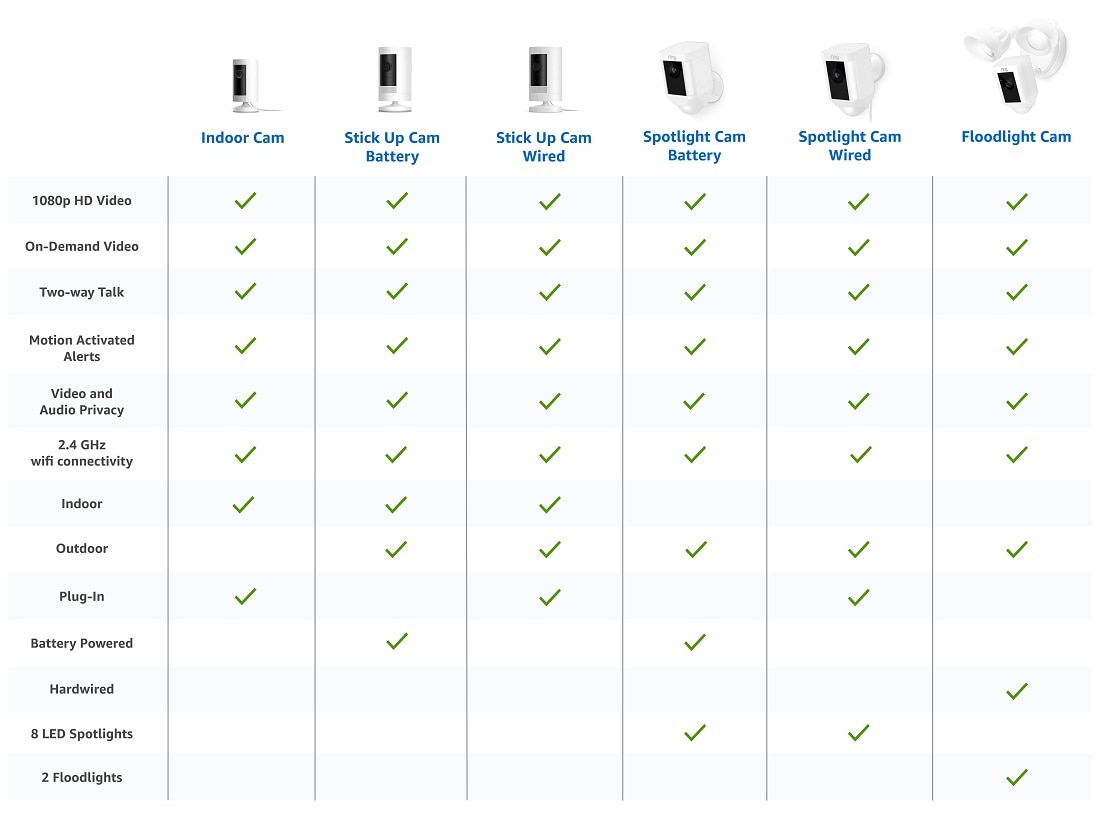
Hello Myra, No, Ring Floodlight Cam is on compatible with wifi networks using 2.4 GHz. Wifi routers broadcast signals in the 2.4 and 5 GHz frequency. A 2.4 GHz connection travels further at a lower speed. A 5 GHz frequency provides faster speeds at a shorter range. The following article lists out the features of individual Ring security cameras along with a recommendation as to which model might be best for you: https://support.ring.com/hc/en-us/articles/115004687606-Ring-Security-Camera-Product-Comparison Ring Community launched in March 2019 to help deliver the most current news and educational information to our customers. You can find tips and tricks from other Ring users at https://community.ring.com/. This peer-to-peer forum allows our neighbors to share their feedback and experiences to assist each other in resolving their concerns. Thank you, Antonio from Ring
If I install RING Camera in my backyard, its video recording will get included in the basic $30/year subscription that I already have for the front door RING Pro2 door bell or do I have to buy separately?
Yes
Hello Noshir, Yes, the Basic plan covers video recording for one doorbell or camera. You add another Basic plan to cover the second device, or you have to option to upgrade to the Plus plan which covers an unlimited number of devices at one location. For more on info , please visit our website: https://ring.com/protect-plans Also, Ring Community was launched to help deliver the most current news and educational information to our neighbors. This online forum is divided into four categories: Product Boards, Ring Updates, Tips + Tricks, and a Moderators’ Corner. The Product Boards are where you can begin new topics with your questions or feedback; there is also a search option that helps you find topics that have already been posted by other neighbors. We invite you to visit our site at https://community.ring.com/ today! All the best, Antonio from Ring
The one subscription only covers 1 camera, however, when you get the multiple subscription coverage, it includes multiple devices. Check with the retailer to make sure this is still the deal.
I have five outdoor ring cameras with recording capability and I am only charged one fee per month for all of them together.
Can the floodlights be controlled in the set-up program
Yes it can be set with your phone even if your 800 miles away. I love my Ring flood lights and security system.
Hello Tommy, Yes, great question! The lights on the Ring Floodlight Camera can be controlled from within the Ring app. Here is a helpful article that elaborates on this device's settings: https://support.ring.com/hc/en-us/articles/115001716843-Controlling-Your-Floodlight-Cam-Through-the-Ring-App. We invite you to reach out at https://community.ring.com/ if any additional information is needed regarding your Ring Floodlight pre-purchase question. Ring Community is our first peer-to-peer community forum, giving our customers the ability to help one another and share their feedback and experiences with Ring. Thank you, Alexis with Ring
Yes you can control the lights turning them off and on it also has a siren you can turn on and off it has motion warning and alerts and motion Detection so you can control it in all functions.
can I hook up a ring floodlight without a neutral wire? I only have 2 black wires
Yes but it comes with a grounds wires so you can grounds it to any metal that's close by
Hello Elkuco, Great question! If your junction box doesn’t have clearly colored black and white wires, then we would recommend that you consult with a licensed electrician before attempting installation. Here is a helpful article that elaborates on the physical installation process of the Ring Floodlight Camera: https://support.ring.com/hc/en-us/articles/115001262846-Floodlight-Cam-Installation-Step-2-Wiring. We invite you to reach out at https://community.ring.com/ if any additional information is needed regarding your Ring Floodlight Camera pre-purchase question. Ring Community is our first peer-to-peer community forum, giving our customers the ability to help one another and share their feedback and experiences with Ring. Thanks, Alexis with Ring
can I hook up a ring floodlight without a neutral wire? I only have 2 black wires
Hello Elkuco, Great question! If your junction box doesn’t have clearly colored black and white wires, then we would recommend that you consult with a licensed electrician before attempting installation. Here is a helpful article that elaborates on the physical installation process of the Ring Floodlight Camera: https://support.ring.com/hc/en-us/articles/115001262846-Floodlight-Cam-Installation-Step-2-Wiring. We invite you to reach out at https://community.ring.com/ if any additional information is needed regarding your Ring Floodlight Camera pre-purchase question. Ring Community is our first peer-to-peer community forum, giving our customers the ability to help one another and share their feedback and experiences with Ring. Thanks, Alexis with Ring
Viewing 1-8 of 598
Customer Reviews
4.5 out of 5
5
2563
4
519
3
131
2
110
1
205
 Customer review from influenster.comCustomer review from influenster.comCustomer review from influenster.comCustomer review from influenster.comCustomer review from influenster.comCustomer review from influenster.comCustomer review from influenster.comCustomer review from influenster.comCustomer review from influenster.comCustomer review from influenster.com