Product Images
New
Black Friday
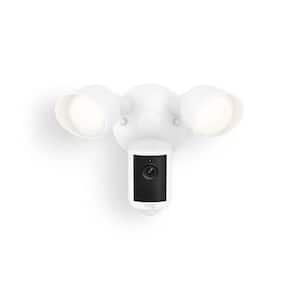
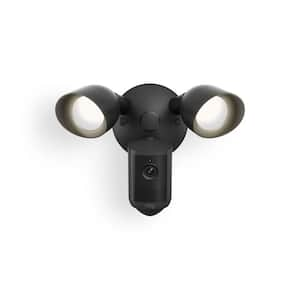
Security Camera Expansion Pack with Floodlight Cam 2K, Wired and Outdoor Cam 2K, Battery

- See more of your home or business with Retinal 2K video
- Get closer to the details with up to 6x Enhanced Zoom
- See, hear, and speak to visitors with Live View and Two-Way Talk
- View More Details
Free & Easy Returns In Store
Return this item within 90 days of purchase.
Ask about this product
Get an answer now with AI
Magic Apron Assistant is an AI virtual assistant. By proceeding, you consent to the recording and use of your information by The Home Depot (and authorized third parties). More information
Product Details
About This Product
Deliver widespread coverage across your biggest outdoor spaces with ultra-bright floodlights, and expand your 2K protection anywhere around home. With Floodlight Cam 2K, essential security features meet motion-activated floodlights to deliver widespread coverage across your biggest outdoor spaces. Plus, Outdoor Cam 2K is Ring's most versatile, weather-resistant outdoor camera, featuring multiple power options and clarity that stays crisp and colorful longer, even in low light.
Highlights
- This bundle contains 1 Floodlight Cam 2K, Wired and 1 Outdoor Cam 2K, Battery.
- See all the crucial details across your home or business with wide-angle Retinal 2K.1
- Bring details into sharp focus with up to 6x Enhanced Zoom.
- Automatically illuminate your property with Floodlight Cam 2K and deter intruders with ultra-bright, motion-activated light.
- See true color with Night Vision on Outdoor Cam 2K, even in low light, and automatically switch to crisp black and white in near darkness.
- See and respond to activity with Live View & Two-Way Talk.
- Scroll back in time to rewatch what you missed, get intelligent alerts that tell you what's happening, and so much more, with a compatible Ring Protect subscription (sold separately).
- Link with select Ring devices, allowing them to activate when your cameras detect movement for additional security, recording angles, and more, subscription required, sold separately.
- Disclaimers 1 Video quality may vary based on internet bandwidth and device temperature.
- Click here to shop more Ring Security Cameras
- Click here to shop more Ring products

- Click here for more information on Electronic Recycling Programs
- Return Policy
Product Information
Specifications
Dimensions: H 9.94 in, W 6.61 in, D 17.36 in
Dimensions
Product Depth (in.) | 17.36 in |
|---|---|
Product Height (in.) | 9.94 in |
Product Width (in.) | 6.61 in |
Details
Camera Connection | Wireless Cameras |
|---|---|
Camera Resolution | 2K |
Camera Technology | IP |
Camera Type | Floodlight |
Color Family | White |
Color/Finish | White |
Connectivity | Wireless (Wireless Network Transmission) |
Exterior Fixture Type | Floodlight w/ Camera |
Features | Battery Backup, Microphone, Motion Sensor, Wall Mountable |
Field of View | 130 Degrees |
Image Sensor Type | CMOS |
Included | Batteries |
Indoor/Outdoor | Indoor, Outdoor |
IP Rating | Not Rated |
Lumens | 2000 |
Microphone | Two-Way Audio |
Night Vision Distance (ft.) | 30 |
Pack Size | 2 |
Power Options | Battery, Hardwired |
Power Source | Battery Operated |
Recording Storage | Cloud |
Remote Access | Remote Access |
Requires Hub? | No Hub Required |
Resolution | 4MP (1440p) |
Returnable | 90-Day |
Rotation Direction | Fixed |
Smart Home | Smart Home Enabled |
Smart Home Protocol | Wi-Fi |
Storage Capability | Cloud |
Video Signal | HD |
Voice Control Hub Required | No Hub Required for Voice Control |
Voltage (V) | 12 V |
Works With | Alexa, Ring |
Warranty / Certifications
Manufacturer Warranty | 1 Year Limited Warranty |
|---|
Questions & Answers
Can you have the light on a timer so it goes on and off at a certain time. Say I always want it on from 6pm to 6am everyday.
Hi Jerry. Thank you for reaching out to us with your question. Yes, the Ring Floodlight Cam Wired 2K has motion-activated lights at night. You can also manually turn the lights on or off in the Ring app or you can also set a light schedule to keep the lights on or off for set days and times. Here is a link to learn more about the light settings: https://ring.com/support/articles/b7aj8/using-light-settings-for-ring-security-cameras. If any additional information is needed regarding your question, please reach out to our community. Ring Community is our first peer-to-peer community forum, giving our customers the ability to help one another and share their feedback and experiences directly with Ring. You can find it here: https://community.ring.com/. Thank you, Amilia from Ring.
Can I connect this with hardwire kit?
Hi jazmine. Thank you for taking the time to share your question with us. No, the Ring Spotlight Cam 2K, Battery is not compatible with a traditional hardwire kit that connects directly to your home's electrical wiring. The Ring Indoor/Outdoor Power Adapter is compatible with this device and allows you to convert your battery-powered camera to a plug-in power source, eliminating the need to recharge the battery. Plug the adapter into an outdoor-rated outlet near your camera's mounting location. Connect the charging cable from the adapter to the charging port on your Spotlight Cam. Once connected, your camera will run on continuous power while keeping the battery as a backup. For more information on using the Ring Plug-In Adapter with your Ring Spotlight Cam 2K, Battery, visit this link: https://ring.com/support/articles/fai45/Ring-Plug-in-Adapter-Gen-2-Information. Also, Ring Community is our first peer-to-peer community forum, giving our customers the ability to help one another and share their feedback and experiences with Ring. If you need more information on the Ring Spotlight Cam 2K, Battery, we invite you to reach out to our Community by visiting this link: https://community.ring.com. Thank you, Melissa from Ring.
How high can you install it off the ground? How far away from router can it be?
Hi Scott. Thank you for taking the time to share your questions with us! We appreciate your interest in the Security Camera Expansion Pack with Floodlight Cam 2K, Wired and Outdoor Cam 2K, Plug-In. Having the right placement for your security cameras is essential because it directly impacts motion detection accuracy and overall coverage of your property. Both the Floodlight Cam 2K and the Outdoor Cam 2K were designed to provide you with reliable home security when installed properly. Rest assured, we are here to provide you with the information you need to get the most out of your devices. For the Floodlight Cam 2K, Wired, the optimal installation height is 9 feet (approximately 3 meters) off the ground. This height provides the best range for the motion detector. With the motion detector parallel to the ground at this height, the Floodlight Cam is optimized for detecting human-sized objects up to 30 feet (10 meters) away. For the Outdoor Cam 2K, Plug-In, we recommend mounting it at a height of approximately 8 to 9 feet off the ground for the best motion detection performance. The camera can be mounted on a wall, ceiling, or flat surface, giving you flexibility in placement. Both devices in this pack connect via wifi and require a stable internet connection. Ring cameras are designed to work within approximately 65 feet (20 meters) of your wifi router through walls. However, the actual range can vary depending on factors such as the number of walls, building materials, and other electronic devices that may cause interference. For optimal performance, a minimum upload speed of 3.5 Mbps is recommended. If your camera will be installed farther from your router, consider using a wifi extender or mesh network to ensure a strong, reliable connection. For more information on setting up your Ring Floodlight Cam 2K, visit this link: https://ring.com/support/articles/bqp0z/installing-floodlight-cam-2k. For more information on setting up Ring Outdoor Cam 2K, please visit this link: https://ring.com/support/articles/5i3yu/installing-outdoor-cam-2k. Also, Ring Community is our first peer-to-peer community forum, giving our customers the ability to help one another and share their feedback and experiences with Ring. If you need more information on the Security Camera Expansion Pack, we invite you to reach out to our Community by visiting this link: https://community.ring.com. Thank you, Melissa from Ring.
What kind of wiring does it require
Hi Chris. That's a great question. The Security Camera Expansion Pack with Floodlight Cam 2K, Wired and Outdoor Cam 2K, Plug-In includes two devices with different wiring requirements, so here is a breakdown for each. The Floodlight Cam 2K (Wired) requires hardwired installation. It needs to be connected to a standard electrical junction box with AC power wiring. Specifically, it requires a 4-inch round UL-listed weatherproof electrical box. The power supply is hardwired at 100 to 240V AC. If you are replacing an existing outdoor floodlight, you can use the existing junction box and wiring. If you do not have an existing junction box, Ring recommends contacting a licensed electrician to have one installed. The installation involves connecting the camera's wires to your home's electrical wiring using the included wire nuts. The Outdoor Cam 2K (Plug-In) does not require any hardwiring at all. It simply plugs into a standard indoor or outdoor power outlet using the included weather-resistant power cable. This makes it a great option if you do not have existing electrical wiring in the location where you want to place the camera. For more information on installing the Floodlight Cam 2K, please visit this helpful article: https://ring.com/support/articles/bqp0z/installing-floodlight-cam-2nd-gen. If any additional information is needed regarding your Security Camera Expansion Pack, please reach out to our community. Ring Community is our first peer-to-peer community forum, giving our customers the ability to help one another and share their feedback and experiences directly with Ring. You can find it here: https://community.ring.com/. Thank you, Melissa from Ring.
I purchased the set from Home Depot. The outdoor cam is battery, not plug in as described. I returned as I did not want a battery.
Does this feature an option to exclude animals setting off an notification?
Hi Beth. Thank you for your question. Yes, the Ring Floodlight Cam 2K Wired does offer features that can help reduce notifications triggered by animals. The camera includes a "Smart Alerts" feature, which uses advanced motion detection to distinguish between people and other types of motion. By enabling Smart Alerts in the Ring app, you can choose to receive notifications only when a person is detected, which would help filter out alerts caused by animals. To enable Smart Alerts, follow these steps: Tap the menu (≡) on the top left of the Ring app. Tap "Devices." Tap your Floodlight Cam 2K Wired. Tap "Motion Settings." Tap "Smart Alerts." Tap "Enable Feature." Tap "Continue." Select your notification preferences and set "Person" to notify you, and set "Other Motion" to record only (no alert notification). Tap "Done." This way, the camera will still record all motion events, including animals, but will only send you a push notification when a person is detected. Additionally, you can further customize your experience by adjusting your Motion Zones and Motion Sensitivity under "Motion Settings" to reduce the detection area or lower the sensitivity, which can help minimize triggers from smaller animals passing through. For more information on refining your motion alerts, please visit this article: https://ring.com/support/articles/9qnpt/Refining-Your-Motion-Alerts-for-People-and-Other-Motions. If you have any additional questions regarding your Ring Floodlight Cam 2K Wired, please reach out to our community. Ring Community is our first peer-to-peer community forum, giving our customers the ability to help one another and share their feedback and experiences directly with Ring. You can find it here: https://community.ring.com/. Thank you, Melissa from Ring.
Does this have wfi
Hi Miriam. Thank you for your question. Yes, the Ring Floodlight Cam 2K Wired connects to your home wifi network. The camera supports 2.4 GHz and 5 GHz wifi networks, so you can connect it to whichever band works best for your setup. A strong wifi signal at the mounting location is important for reliable video streaming and notifications. During setup, the Ring app will walk you through connecting the camera to your wifi network step by step. For more information on setting up your Ring Floodlight Cam Wired (2K) and wifi requirements, please visit this helpful article: https://ring.com/support/articles/92bd2/Understanding-wifi-recommendations-for-Ring-devices. If you have any additional questions regarding the Ring Floodlight Cam Wired (2K), please reach out to our community. Ring Community is our first peer-to-peer community forum, giving our customers the ability to help one another and share their feedback and experiences directly with Ring. You can find it here: https://community.ring.com/. Thank you, Melissa from Ring.
Can this be mounted under an eave?
Hi Jill. Thank you for taking the time to ask this question. Yes, the Ring Floodlight Cam 2K can be mounted to a ceiling, wall, eave, or overhang. You will need to rotate both the lights outward if you are mounting the Floodlight Cam 2K on an eave or overhang. You can find more information on the installation here: https://ring.com/support/articles/bqp0z/installing-floodlight-cam-2k. We invite you to reach out to our community if any additional information is needed regarding your question. The Ring Community is our first peer-to-peer community forum, giving our customers the ability to help one another by sharing their feedback and experiences with each other. You can find it here: https://community.ring.com/. Thank you, Miyuki from Ring.
Do you need a subscription to ring
Yes if you want to view past videos. Otherwise it's just a live feed. $50 a year for the basic which is all you need
Hi Jana. Thank you for your question today! No, a subscription is not required to use the Ring Floodlight Cam 2K’s standard features (real-time notifications, live view, and two-way talk). The Ring Protect Plans offer downloading and sharing video capabilities, along with additional features for those who want them. You can learn more about the Ring Protect Plans and its available features here: https://ring.com/support/articles/lw54x/ring-subscriptions. We invite you to reach out to our community if any additional information is needed regarding your question. The Ring Community is our first peer-to-peer community forum, giving our customers the ability to help one another by sharing their feedback and experiences with each other. You can find it here: https://community.ring.com/. Thank you, Miyuki from Ring.
Viewing 1-8 of 21
Customer Reviews
4.7 out of 5
Loading Recommendations
Related Products

Spotlight Cam Plus, Battery - Smart Security Video Camera with LED Lights, 2-Way Talk, Color Night Vision, White, 2-Pack
Say bye-bye to blind spots. Spotlight Cam Plus is your go-to protection for any out-of-sight area thanks to Color Night Vision, customizable Motion Detection, and a pair of bright, motion-activated lights. Simply mount the wireless camera, adjust the viewing angle, and consider the area covered. Stay powered with a rechargeable battery that swaps in and out without messing with your setup.
Spotlight Cam 2K, Battery - Security Camera, Retinal 2K Video, 6x Enhanced Zoom, Motion-Activated Spotlights, White
Bring bright, motion-activated lights and crisp Retinal 2K1 video to key spaces all around your property. Easy to power and mount, Spotlight Cam 2K automatically lights up out-of-sight areas and delivers instant alerts when it detects motion. Helping you see what's up and deter intruders at all hours.

Wireless Outdoor 1-Camera System Plus Floodlight
Blink Floodlight works with Outdoor to deliver a wire-free, battery-powered HD smart security LED floodlight camera. See, hear and speak to visitors in real time with 1080p HD live view and 2-way audio from the app. Set up yourself in minutes - connect Outdoor to Wi-Fi___33 and follow in-app instructions. Mount where you want with the included kit (hook included for no drill installation on vinyl siding). Works with Alexa - use your voice to monitor your home with live view, motion alerts and activate lights with select Alexa devices.

Floodlight Cam Hardwired Plus Security Camera with Indoor Cam 2-Gen, White
The next generation of our bestselling Floodlight Cam. Protect large outdoor areas like the driveway, garage or backyard with motion-activated LED floodlights, 1080p HD video, and a built-in security siren. Customize the motion zones to monitor specific areas and get real-time notifications when motion is detected. Use the Ring App to see what's happening, turn on the lights, speak to visitors, and even sound the siren when you need to. It also comes with a free 30-day trial of Ring Protect Plus, so you can review, save and share all your Ring videos at anytime, with anyone. Versatile protection and personalized peace of mind. That's Indoor Cam (2nd Gen). Get the whole picture in real time with 1080p HD video and Color Night Vision, right from your phone. Or keep the picture private by using the manual, removable Privacy Cover to turn off audio and video with a simple swivel. Indoor Cam includes an adjustable camera mount-and can plug in wherever there's a power outlet-making it easy to find the perfect view up high or down low.