Product Images
Black Friday
Bulb Cam Plug-In, 2K Wireless HD Security Camera Outdoor Indoor Full Color Day and Night, Dimmable LED Bulb

- Motion-activated light and security camera
- Pan-and-tilt mechanism offers wider coverage
- Features a dimmable 800 lumen LED bulb
- View More Details
Free & Easy Returns In Store
Return this item within 90 days of purchase.
Ask about this product
Get an answer now with AI
Magic Apron Assistant is an AI virtual assistant. By proceeding, you consent to the recording and use of your information by The Home Depot (and authorized third parties). More information
Product Details
About This Product
Protect your home day and night with Wyze Bulb Cam, the 2-in-1 outdoor security camera and smart LED light bulb. Capture clear 2K HD video with color night vision, receive instant motion alerts, and control your lighting from anywhere with the Wyze app. Easy to install, fits most fixtures, and supports local video storage-no subscription needed.
Highlights
- Smart Lighting and Wide 160° View Security Camera - A motion-activated light and security camera are conveniently powered by any light fixture for effortless outdoor protection and automation. Sees more with a 160° wide-view bulb camera for enhanced protection.
- Clear 2K HD Resolution with WDR and Color Night Vision - Protect double the area in greater detail with high-definition clarity. WDR evens out darker and lighter spots in the same scene for a more even picture.
- Dimmable 800 lumen LED Bulb - customize the brightness on these long-lasting LED bulbs to achieve the perfect lighting.
- Telescoping internal rod and adjustable pan & tilt - extend the camera up to 1.2inch, pan 360° and tilt up to 110° to find just the right angle.
- 24/7 Local Recording with MicroSD Card* - Don't miss a thing with continuous local recording to a microSD card up to 256 GB. No subscription required. (*MicroSD cards sold separately. )
- Two-Way Audio & Free detection alerts - Speak to people and pets from anywhere right from your smartphone. Get notified on your smartphone when motion and sound are detected.
- AI Notifications and Descriptive Alerts - Customize your notifications and only get notified when People, Pets, Packages and Vehicles are detected. Get a detailed alert of what's happening with Descriptive Alerts, available with Cam Plus Unlimited (OPTIONAL).
- Easy Bluetooth Setup - This light bulb camera enables Bluetooth setup (No need to scan QR codes.) and works with Alexa/Google Assistant/IFTTT and Wyze Rules for smart home automation.
- Group Light Control with Wyze Accessory Bulbs - Pair up to 5 Accessory Bulbs for full coverage smart lighting. NOTE: This bulb cam is only compatible with Wyze Bulb Cam Accessory Bulb (Accessory Bulb sold separately).
- Click here for more information on Electronic Recycling Programs
- Return Policy
Product Information
Specifications
Dimensions: H 4.72 in, W 2.36 in, D 2.36 in
Dimensions
Product Depth (in.) | 2.36 in |
|---|---|
Product Height (in.) | 4.72 in |
Product Width (in.) | 2.36 in |
Details
Cable Connection | WiFi |
|---|---|
Camera Connection | Wireless Cameras |
Camera Resolution | 2K |
Camera Technology | IP |
Camera Type | Bullet |
Color Family | White |
Color/Finish | White |
Connectivity | Wireless (Wireless Network Transmission) |
Features | 2-Way Audio, Built-in Microphone, Built-in Speaker, Mobile Notifications, Weather Resistant |
Field of View | 160 Degrees |
Image Sensor Type | CMOS |
Included | Mounting Hardware |
Indoor/Outdoor | Indoor, Outdoor |
IP Rating | Weather Resistant |
Microphone | Two-Way Audio |
Night Vision Distance (ft.) | 30 |
Pack Size | 1 |
Power Options | Plug-in |
Power Source | Plug-in |
Remote Access | Remote Access |
Requires Hub? | No Hub Required |
Resolution | 4MP (1440p) |
Returnable | 90-Day |
Rotation Direction | Fixed |
Smart Home | Smart Home Enabled |
Smart Home Protocol | Wi-Fi |
Storage Capability | Cloud, SD Card |
Video Signal | HD |
Voice Control Hub Required | No Voice Control |
Voltage (V) | 120 V |
Works With | Alexa, Google Assistant |
Warranty / Certifications
Manufacturer Warranty | 1 Year Warranty |
|---|
Questions & Answers
What app does it require and is there a fee?
Hi there! You will need to download the Wyze app to set up the Wyze Bulb Cam. The Wyze app is available in Android and iOS device and it's free to use.
Wireless or cable?
Hi there! The Wyze Bulb Cam is compatible with an E26 light socket only.
Do I just plug the light bulb in my on my porch
Thanks for reaching out! Yes, the Wyze Bulb Cam can be easily installed by screwing it directly into your existing E26 light socket on your porch, just like a regular light bulb. No additional wires, power cords, or adapters are needed!
does the unit need to have some type of cover over it to protect it from rain etc. Im thinking of using this in one of the outside lights on my garage.
Hi there! The Wyze Bulb Cam camera portion has an IP65 weather-resistance rating, while the bulb portion is UL Damp-rated. This means the camera is protected against rain and water exposure, but the bulb portion is designed for damp locations rather than direct exposure to rain.
Do I need WiFi
Hi there! Yes, the Wyze Bulb Cam requires a Wi-Fi connection to set up and access live view, motion alerts, and other smart features through the Wyze app. It connects to a 2.4 GHz Wi-Fi network. If you have other questions, concerns, or would like to speak more about our products, please reach out to our Wizards team (https://support.wyze.com/hc/en-us) so we may help. Thank you and have a great day!
Waterproof?
Hi there! Thank you for reaching out! The camera portion of the Wyze Bulb Cam is IP65 rated, while the bulb is UL Damp rated.
How does it hold up to high and low temperatures
Hi Doug, thanks for reaching out about this! The Wyze Bulb Cam is officially rated for an operating temperature range of -4°F to 122°F (-20°C to 50°C).While it is built to handle standard outdoor weather fluctuations within that window, we know extreme heat or freezing cold can sometimes cause performance concerns for smart devices. If you are experiencing unusual weather dips or spikes in your area that are impacting your camera, please reach out to our support team directly so we can help look into a solution for you. For anyone else wondering about placement, keeping the camera within this specified temperature range ensures optimal performance year-round!
Can I connect multiple cameras to the same app
Hi Cris, thanks for reaching out with your question! Yes, you can absolutely connect multiple cameras including the Wyze Bulb Cam to the same Wyze app. As long as they are all registered to your single Wyze account, you can manage them, view their live streams, and even organize them into custom camera groups right from your phone's home screen. If you run into any trouble setting up additional cameras or organizing your dashboard, please let us know we're always happy to help!
Viewing 1-8 of 43
Customer Reviews
3.9 out of 5
5
221
4
62
3
42
2
34
1
50
 Customer review from wyze.comCustomer review from wyze.comCustomer review from wyze.comCustomer review from wyze.comCustomer review from wyze.com
 Customer review from wyze.comCustomer review from wyze.comCustomer review from wyze.comCustomer review from wyze.com
Loading Recommendations
Related Products

Tapo 2K QHD Wi-Fi Indoor Plug-In Smart AI Detection Security Camera, Privacy Shutter, Color Night Vision, Magnetic Base
The Tapo C125 is the first Tapo smart AI home security spot camera designed with a privacy shutter. You can easily activate the privacy mode by clicking the button on the product shell or using the Tapo app, ensuring you won't be monitored by the camera whenever needed. As a 2K 4MP camera with AI image enhancement function, you can always view clear images even in low light or overexposed environments. The 140° wide-angle design provides you with a broader viewable area, allowing you to monitor what matters most to you. Switch to the 940nm IR invisible LED to watch over your baby or pet during the night without interrupting them. You can save recorded videos on the microSD Card (up to 512 GB, purchased separately) or use Tapo Care cloud storage services (subscribe separately). The AI algorithm of Tapo C125 can identify people, pets, vehicles and even recognize a baby crying and other sounds, notifying you as needed. The friendly compact and magnetic design of Tapo C125 offers you the flexibility to place the device wherever needed. Furthermore, free up your hands with voice assistants such as Alexa, Google Assistant and Apple Homekit. Tapo C125 also supports Wi-Fi 6 environments for more stable and consistent live views. As a fully equipped security camera, Tapo C125 also supports functions such as 2-way audio, customizable sound and light alarms and clip sharing.

Smart Home Wireless Wi-Fi Security Camera for Dog/Pet/Nanny 1080p HD Baby Monitor Color Night Vision, Sound Detection
The Xodo E6 is a popular dome camera that packs a huge punch, with its 1080P Hi-Def resolution you are able to see who is at your door way before they even get there due to its motion detection feature that notifys your smartphone with real-time alerts. The E6 also makes a wonderful addition to your home for security and even get to watch over little ones at night in case they wake up in the middle of the night you will be able to see and hear them if they need your attention. With the ability for multiple shared accounts making it enough for the whole family to be included and not left out if ever an emergency should rise. Easy installation and set up with no hassle and no headaches you can set the E6 up in no time, The Xodo app is available for IOS and Android giving you full customizable features and with noise cancellation so you aren't hearing any unnecessary noise if you should ever be recording video.
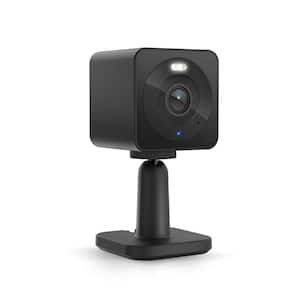
Cam OG, Wired Indoor/Outdoor 1080p HD Smart Home Security Camera with Built-In Spotlight, Black
WYZE Cam OG is the 4th generation of WYZE's flagship camera, WYZE Cam. Like its predecessor WYZE Cam OG lets you see and record 1080p video right from the WYZE mobile app. New to WYZE Cam OG is its waterproof design allowing for outdoor installation with an IP65 rating. WYZE Cam OG also includes our Starlight Sensor which allows for extreme low-light performance and shows great detail in the dark. with WYZE Cam OG's color night viewing, night time video recording appears as if it's day time. Use the integrated spotlight for even better light at night.
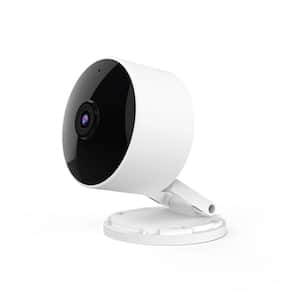
Plug-In Smart Indoor Security Camera with 2K WIFI, Motion Detection, Night Vision, and 2-Way Audio, White
Sharper Alerts. Smarter Home. No Fees. The Feit Electric Indoor Smart Camera delivers next-level peace of mind-powered by Generative AI. From pets to people to unexpected noise, it gives you intelligent, real-time alerts that describe exactly what's happening inside your home. No vague motion alerts. No subscriptions. Just clarity you can count on. Compact, Clear, and Always On This small-but-mighty camera fits anywhere and captures crisp 2K HD video, day or night. Night vision sees clearly up to 30 feet in the dark. Use the Feit Electric app to view live footage, talk through two-way audio, and get instant alerts when motion or sound is detected. Smarter Search. Private Storage. Find exactly what you need-fast. Search recorded footage using natural phrases like "dog barking at night" or tag key moments for quick playback. Store video locally on a microSD card (sold separately), with no cloud storage or subscription fees. Easy Setup. Total Control. Two-way audio to talk to pets, kids, or visitors AI-powered notifications for people, pets, and sounds Works with Alexa and Google Nest smart displays Simple plug-in setup with 2.4GHz Wi-Fi Smart home monitoring that works right out of the box-and never asks for a monthly fee.