Product Images
Nest Cam (Battery) - Outdoor or Indoor Security Camera + Weatherproof Cable (10M)

- Battery-powered, weather-resistant smart home security camera
- 10M weatherproof cable provides continuous power
- Nest Cam can send you an alert when it spots a person or vehicle
- View More Details
Free & Easy Returns In Store
Return this item within 90 days of purchase.
Ask about this product
Get an answer now with AI
Magic Apron Assistant is an AI virtual assistant. By proceeding, you consent to the recording and use of your information by The Home Depot (and authorized third parties). More information
Product Details
About This Product
Secure your property inside and out with the versatile and weather-resistant Nest Cam home security camera. Designed to go almost anywhere without the hassle of wires, this adaptable surveillance solution delivers intelligent alerts directly to your smartphone whenever it spots movement, a person or a vehicle. You can easily monitor your home using the Google Home app, which provides live video monitoring, three hours of free event video history and seamless two-way communication so you can speak with visitors in an instant. For ultimate peace of mind, you can add a weatherproof cable for continuous power and unlock 24/7 video history with a Nest Aware Plus subscription (sold separately). Upgrade your home protection with this sleek and reliable camera built to keep your home safe and connected.
Highlights
- Bundle includes one Nest Cam (battery) security camera, one 10-m (32.8 ft.) weatherproof cable, and an additional 1-m Indoor Cable
- Weatherproof cables keep your nest cam connected with continuous power, no charging required
- Wiring Nest Cam gives you access to additional features, like 24/7 video history with Nest Aware Plus (sold separately)
- Get alerts about the things that matter most; the Nest Cam home security camera will send you an alert when it spots movement, a person or a vehicle; you can choose which alerts you get in the Google Home app
- Outdoors or indoors, rain or shine, the Nest Cam security camera is weather resistant and wireless, so it's designed to go almost anywhere, from the living room to the backyard
- Know what's happening 24/7 or go back in time: check in anytime using the Google Home app or see what happened with three-hours of free event video history; add a Nest Aware subscription for up to 60-days of video history
- Take action in an instant: if something happens, you can talk and listen through your security camera or call your local emergency service directly from the Google Home app
- Wi-Fi problems are not a problem; if your Wi-Fi goes down or there's a power outage, Nest Cam home security cameras will store up to an hour of recorded events so you can see what you missed
- Disclaimers: some features, including mobile notifications, remote control, video streaming and video recording, require working internet and Wi-Fi; Nest Aware subscription sold separately; the 911 emergency feature requires Nest Aware subscription (sold separately); this feature is dependent upon network connectivity and other factors and may not be available in all areas; wireless devices may not be reliable for emergency communications; the 911 feature will connect you with the 911 call center covering the home address you provide during setup of this feature
- Click here to shop for more Google products
- Click here for more information on Electronic Recycling Programs
- Return Policy
Product Information
Specifications
Dimensions: H 3.27 in, W 3.27 in, D 3.27 in
Dimensions
Product Depth (in.) | 3.27 in |
|---|---|
Product Height (in.) | 3.27 in |
Product Width (in.) | 3.27 in |
Details
Cable Connection | WiFi |
|---|---|
Camera Connection | Wireless Cameras |
Camera Resolution | 1080p |
Camera Technology | IP |
Camera Type | Stick Up |
Color Family | White |
Color/Finish | White |
Connectivity | Wireless (Wireless Network Transmission) |
Features | 2-Way Audio, Night Vision, Weather Resistant |
Field of View | 130 Degrees |
Image Sensor Type | CMOS |
Included | Cables, Mounting Hardware |
Indoor/Outdoor | Indoor, Outdoor |
IP Rating | Weather Resistant |
Microphone | Two-Way Audio |
Night Vision Distance (ft.) | 20 |
Pack Size | 1 |
Power Source | Battery Operated |
Resolution | 2MP (1080p) |
Returnable | 90-Day |
Rotation Direction | Fixed |
Storage Capability | Cloud |
Video Signal | HD |
Voltage (V) | 3.65 V |
Works With | Homey |
Warranty / Certifications
Manufacturer Warranty | 1 year limited warranty |
|---|
Questions & Answers
How long will battery last
Hey there. Battery life on the Nest Cam (Battery) depends on factors like activity, temperature, and your camera settings. On average, here's how long the battery will last on a single charge: Busy - About 1 month battery life (about 25 - 30 recorded events per day) Typical - About 2.5 months battery life (about 13 - 16 recorded events per day) Quiet - About 6 months battery life (about 2 - 5 recorded events per day) For tips on how to conserve battery, here's a link: https://support.google.com/googlehome/answer/10901611?hl=en
Does this camera detects pets within the recording zone?
Great inquiry, PalmRidge. Yes! The Nest Cam (Battery) has animal detection — it detects dogs and cats, but you may also get notified about other types of animals. It intentionally tries not to detect birds or insects. Here’s a link with more details: https://support.google.com/googlenest/answer/11444456?hl=en-GB
Does it require subscription?
Hey there, PHarry. No! You don’t need Google Home Premium to use the Nest Cam (Battery). Although, subscribing unlocks additional features such as continuous video recording, person detection, and more. Here’s a link with more benefits: https://support.google.com/googlenest/answer/9233159?hl
Will this camera work for someone who does not have wifi?
Thanks for asking. No, the Nest Cam (Battery) needs Wi-Fi for live viewing and cloud storage. Here’s a link with more information: https://support.google.com/googlenest/answer/9245832?hl=en
Are the Google Nest cameras (Battery) ONVIF compliant? Do they have the ability to add a solar power source?
Hi there, JonD. The Nest Cam (Battery) operates via the Google Home app and has the option of connecting to a solar panel for battery charging.
What is the range of this camera?
Great inquiry, Chuck. While there isn’t a specified range for the Nest Cam Outdoor (Wired, 2nd Gen), for optimal video quality at 1080p, a broadband internet connection with at least 2 Mbps upload speed per camera is recommended. For more details, here’s a link: https://support.google.com/googlenest/answer/9259110
If the camera is accidentally deleted from the Google Home app and not recognized by the setup ID, how can it be re-installed?
Hi there, Logan. We’re sorry the Nest Doorbell (Wired, 2nd Gen) wasn’t quite what you were looking for. We’d be happy to help resolve any concerns you may have and make your experience as good as possible — when you get a minute, contact us here: https://support.google.com/googlenest/gethelp Great question,, SMck. If you’re not able to add the Nest Cam (Battery) either by the QR code or the setup code found at the bottom of the camera, you may need to factory reset the device — here’s how: 1. Plug the camera into a power source. 2. Locate the reset button on the back of the camera. 3. Press and hold for 5 seconds. 4. Your camera will restart, and the status light will be steady and solid white. If this doesn’t resolve your problem, don’t hesitate to reach out to us here: https://support.google.com/googlenest/gethelp?
What's the freezing point for the outdoor camera?
Thanks for asking, RajC. The Nest Cam (Battery) is designed to operate optimally in temperatures between -4°F to 104°F (-20°C to 40°C). Here’s a guide with more information: https://support.google.com/googlenest/answer/11830989
Viewing 1-8 of 78
Customer Reviews
3.6 out of 5
5
160
4
33
3
19
2
22
1
68

Your Nest Cam (battery) can accommodate up to 10 days of continuous video recording (CVR) and 24/7 video history if hardwired to power, and subscribed to Nest Aware Plus ($12 a month for all your cameras, speakers, and displays on the same home structure).
Motion detection for your Nest Cam (Battery) can be affected by changes in the light level, and shadows moving across the frame like when a cloud moves in front of the sun. This also includes other movements within the camera's field of view like trees or bushes swaying. Night Vision video quality can be affected by internet speed and other issues, but most Night Vision specific issues are caused by the camera’s infrared light that reflects off a surface near the camera, like a shelf, window, window screen, or wall. Here are some recommended steps that may be helpful with the issue:
- Clean the lens with a soft cloth that’s made for cleaning optics. Dust, thumbprints, and dirt can cause poor image quality.
- Turn your camera so that any nearby surfaces or objects (like a wall) are out of view.
- Use the Google Home app to Zoom and Enhance and crop out surfaces or objects that may be the cause of the glare.
- If a bright white shape along the edge appears while everything else is too dark, there might be a surface that’s too close in your camera’s view (like a wall). Angle your camera so the surface stays out of view.
- Move nearby objects that may reflect the infrared light.
Your feedback is important to us, and we’d like to help you the best way possible. If you have a Nest Aware subscription, but don't record motion as expected, we suggest you contact our support team. We’d be more than happy to assist you here: https://support.google.com/googlenest/gethelp
We understand that you have enjoyed using the Nest app with your Nest cameras. However, our priority with this launch was building a complete experience for our new cameras and doorbell in the Google Home app. We wanted to make the Google Home app as the one place you can control all your favorite Nest and other smart home devices with the Google Assistant. The new Nest Cameras and doorbells are exclusive to the Home app because we wanted to create an integrated experience with other Google Nest speakers and displays. Here are some benefits you can get by using the Google Home app with your Nest Cam (Battery):
- Automatic security protections such as Suspicious activity detection, 2-Step Verification and Security Checkup.
- Your Google Nest devices and services will work together. For example, if you have a Nest Cam and a Nest Hub, just say, "Hey Google, show me the backyard camera” to cast your camera stream to your display without any additional setup.
- One account to sign into both the Nest and Google Home apps.
- Your homes and home members will be aligned across the Nest and Google Home apps.
If you're willing to try, you may transfer your old Nest cameras to the Google Home app. Check out this help article for more information: https://support.google.com/googlenest/answer/9893532
Our support team would be happy to address any concerns you may have on Nest Cam (Battery). You´re always welcome to contact our support team here: https://support.google.com/googlenest/gethelp
Loading Recommendations
Compare Key Features
Product Snapshot | |
|---|---|
Ideal for homeowners wanting 24/7 video history, intelligent alerts, and two-way audio for enhanced security. | Ideal for homeowners looking for 24/7 video history, ensuring added security and peace of mind. |
Resolution | |
2MP (1080p) | 2MP (1080p) |
Field of View | |
130 Degrees | 130 Degrees |
Night Vision | |
Motion Detection | |
Two-Way Audio | |


Related Products

Nest Cam (Battery) - Outdoor or Indoor Security Camera + Weatherproof Cable (5M)
Secure your property inside and out with the versatile and weather-resistant Nest Cam home security camera. Designed to go almost anywhere without the hassle of wires, this adaptable surveillance solution delivers intelligent alerts directly to your smartphone whenever it spots movement, a person or a vehicle. You can easily monitor your home using the Google Home app, which provides live video monitoring, three hours of free event video history and seamless two-way communication so you can speak with visitors in an instant. For ultimate peace of mind, you can add a weatherproof cable for continuous power and unlock 24/7 video history with a Nest Aware Plus subscription (sold separately). Upgrade your home protection with this sleek and reliable camera built to keep your home safe and connected.

Nest Cam (Battery) - Outdoor or Indoor Security Camera (2-Pack) + 2 Weatherproof Cables (10M)
Secure your property inside and out with the versatile and weather-resistant Nest Cam home security camera. Designed to go almost anywhere without the hassle of wires, this adaptable surveillance solution delivers intelligent alerts directly to your smartphone whenever it spots movement, a person or a vehicle. You can easily monitor your home using the Google Home app, which provides live video monitoring, three hours of free event video history and seamless two-way communication so you can speak with visitors in an instant. For ultimate peace of mind, you can add a weatherproof cable for continuous power and unlock 24/7 video history with a Nest Aware Plus subscription (sold separately). Upgrade your home protection with this sleek and reliable camera built to keep your home safe and connected.

Nest Cam (Battery) - Outdoor or Indoor Security Camera (2-Pack) + 2 Weatherproof Cables (5M)
Secure your property inside and out with the versatile and weather-resistant Nest Cam home security camera. Designed to go almost anywhere without the hassle of wires, this adaptable surveillance solution delivers intelligent alerts directly to your smartphone whenever it spots movement, a person or a vehicle. You can easily monitor your home using the Google Home app, which provides live video monitoring, three hours of free event video history and seamless two-way communication so you can speak with visitors in an instant. For ultimate peace of mind, you can add a weatherproof cable for continuous power and unlock 24/7 video history with a Nest Aware Plus subscription (sold separately). Upgrade your home protection with this sleek and reliable camera built to keep your home safe and connected.
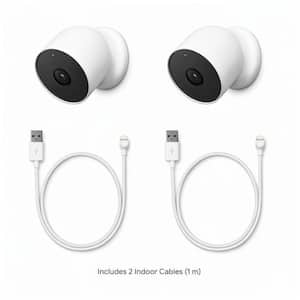
Nest Cam (Battery) - Outdoor or Indoor Security Camera (2-Pack) + 2 Cables (1M)
Secure your property inside and out with the versatile and weather-resistant Nest Cam home security camera. Designed to go almost anywhere without the hassle of wires, this adaptable surveillance solution delivers intelligent alerts directly to your smartphone whenever it spots movement, a person or a vehicle. You can easily monitor your home using the Google Home app, which provides live video monitoring, 3-hours of free event video history and seamless 2-way communication so you can speak with visitors in an instant. Upgrade your home protection with this sleek and reliable camera built to keep your home safe and connected.