Product Images
- Easy to set timer turns lamps off at desired times daily
- Set time in 30 minute intervals with convenient override switch
- Helps cut energy costs and keep your home safe
- View More Details
Free & Easy Returns In Store
Return this item within 90 days of purchase.
Ask about this product
Get an answer now with AI
Magic Apron Assistant is an AI virtual assistant. By proceeding, you consent to the recording and use of your information by The Home Depot (and authorized third parties). More information
Product Details
About This Product
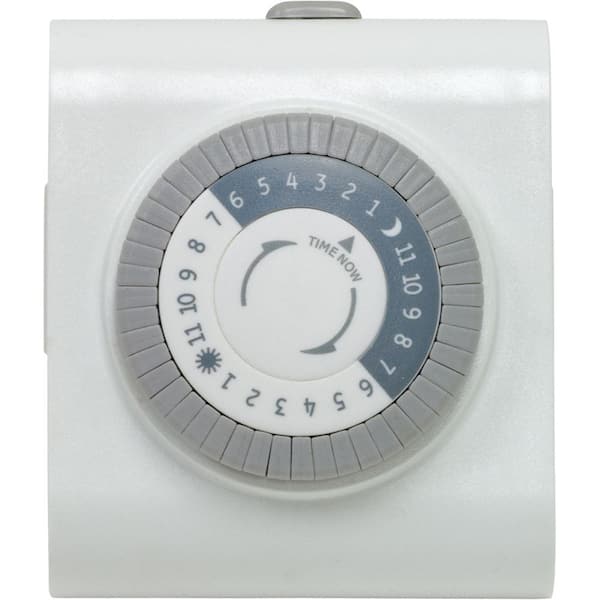
Help keep your energy costs low and feel secure using a 24-Hour Big-Button Mechanical Timer from GE. Effective with any polarized plug, the timer turns your devices on and off with an easily programmable push of a pin. Just push down the pins (ensuring all pins are pulled up first), each representing a 30-minute interval, for the times you want your electrical device to stay on. It features one polarized outlet and an override "outlet on" switch for your convenience, and is compatible with CFL, LED and incandescent light sources. The GE 24-Hour Big-Button Mechanical Timer is perfect for controlling lamps, seasonal lighting or deterring crime when you are away. For indoor use only.
Highlights
- Turns lamps, seasonal lighting, fans and other small appliances on and off at your set desired times saving you energy and deterring crime when you are away from home.
- The timer allows you to set on and off times at 30 minute intervals for a total of 48 On/Off options that will cycle daily without having to reset.
- Features 1 polarized outlet and a convenient override switch at the top of the timer allowing you to use your light/appliance manually when needed.
- The plug-in mechanical timer is intended for indoor use only. LED, CFL, Incandescent and Halogen bulb compatible.
- Ratings - 125VAC 60 Hz: 15A Max General Purpose, 15A MAX Resistive, 1250W MAX Tungsten, ½ HP
- Manual override ON switch
- Works with CFL, LED and incandescent bulbs
- Deters crime
- Saves energy, saves money
- Click here for more information on Electronic Recycling Programs
- Return Policy
Product Information
Specifications
Details
Amperage (A) | 15 A |
|---|---|
Color Family | White |
Indoor/Outdoor | Indoor |
Package Quantity | 1 |
Returnable | 90-Day |
Voltage (V) | 125 V |
Warranty / Certifications
Manufacturer Warranty | 1 Year Limited Warranty |
|---|
Questions & Answers
Had a blackout a few days ago
Hello Phyllis, thank you for your question. This should last for several years. If your device is no longer working, please give us a call between the hours of 7:00 AM – 8:00 PM Central Standard Time, Monday thru Friday at 1-800-654-8483, and press option 4. Please refer to your ticket number (546009) if you decide to give us a call. Thank you.
Can i use this timer to turn on and turn offf a window type A/C..?
no you need a heavy duty grounded 15 amp timer.
Hello Valued Customer, thank you for your question. As loong as you are not exceeding the electrical ratings, and your plug will fit, then yes you can do that. If you have any further questions, please don’t hesitate to respond or give us a call between the hours of 7:00 AM – 8:00 PM Central Standard Time, Monday thru Friday at 1-800-654-8483, and press option 4. Please refer to your ticket number (538273) if you decide to give us a call. Thank you.
The instructions werent really helpful
you can see in the picture I posted for you. the little arrow points at the current time, which is how you set the time on it. then the pegs, up is for off down is for on, you can see I set the light timer is set for off 7 pm to 9 30 am, then on from 9 30 to 12 noon, off from 12 noon to 2 pm, then on from 2 pm to 7 pm
Hi Dantheman85, thank you for your question. Yes, once you have pushed the pins down for your programmed times you will need to set the switch from “Outlet on” to “Timer ON” to activate the timer. Please make sure to set your current time by rotating the timer’s dial clockwise until the pointer on the face of the dial points to the current time of your day. If you have any further questions or need further assistance, our Timer Experts are happy to assist. Please don't hesitate to respond or give us a call between the hours of 7:00 AM – 8:00 PM Central Standard Time, Monday thru Friday at 1-800-654-8483. Thank you.
In your pictures it has a 2 prong and a three prong plug on the side. Which is it?
Hello Barbunc, thank you bringing this matter to our attention. We apologies for the inconvenience that this may have caused you. We have notified our digital content team to update the images as soon as possible. This timer is designed with a 2 prong plug and a 2 prong (polarized) outlet on the side. If you have any further questions, please don't hesitate to respond or give us call between the hours of 7:30AM – 4:30PM Central Standard Time, Monday thru Friday at 1-800-654-8483. Thank you.
On the dial what times of day does the sun and moon represent
Hi Jcrocks1, great question and thank you for reaching out to us regarding our GE 24-Hour Plug-In Button Timer. The sun represents noon and the moon represents midnight. If you have any further questions, please don't hesitate to respond or contact our Customer Support through phone or email. Thank you, Jasco Products Tech Support.
How do you set the time for this to come on
Hi Jt, thank you for your question. Here are the steps to set up your timer. First, be sure all segments (Pins) are pushed up before programing. Select a time period you want the lamp to turn on, then push down all the segments that fall on or within that time period. For example, to have the timer turn a lamp ON at 10PM and off at 2AM, push down the segments representing 10PM and 2AM, and all the segment in between. Rotate the timer’s dial clockwise until the pointer on the face of the dial points to the current time of the day. Note: Nighttime hours (from 6:30 PM to 6:30AM) are highlighted with a black background. Set master switch, located on top of the timer, to the TIMER ON position. Plug the lamp into the outlet on the side of the timer. Make sure that the lamp switch is ON. The timer will not turn the lamp on if the switch is off. If you have any further questions, please don't hesitate to respond or contact our Customer Support through phone or email. Thank you, Jasco Products Tech Support.
You set the time by spinning the dial.
how do I set timer
You just push down the pins (ensuring all pins are pulled up first), each representing a 30-minute interval, for the times you want your electrical device to stay on.
Hi Mike, thank you for your question. Here are the steps to set up your timer. First, be sure all segments (Pins) are pushed up before programing. Select a time period you want the lamp to turn on, then push down all the segments that fall on or within that time period. For example, to have the timer turn a lamp ON at 10PM and off at 2AM, push down the segments representing 10PM and 2AM, and all the segment in between. Rotate the timer’s dial clockwise until the pointer on the face of the dial points to the current time of the day. Note: Nighttime hours (from 6:30 PM to 6:30AM) are highlighted with a black background. Set master switch, located on top of the timer, to the TIMER ON position. Plug the lamp into the outlet on the side of the timer. Make sure that the lamp switch is ON. The timer will not turn the lamp on if the switch is off. If you have any further questions, please don't hesitate to respond or contact our Customer Support through phone or email. Thank you, Jasco Products Tech Support.
Why do they have the dials going counterclockwise? They should run clockwise just like a clock runs!
Hi Josh, Great question and thank for reaching out to us regarding out 24-Hours Plug-In Big Button Timer. The reason why the timer dials counter clockwise is because of how the motor is design to run inside the timer. If you have any further questions, please don't hesitate to respond or contact our Customer Support through phone or email. Thank you, Jasco Products Tech Support (Manufacturer).
Viewing 1-8 of 24
Customer Reviews
4.1 out of 5
5
36
4
14
3
2
2
2
1
7
 Customer review from Byjasco
Loading Recommendations
Compare Key Features
Product Snapshot | |||
|---|---|---|---|
Ideal for customers who want to save energy and deter crime with easy 24-hour programming. | Ideal for customers who want easy 24-hour programming, ensuring energy savings and security. | Ideal for customers who want a programmable 7-day schedule, ensuring home automation and security. | Ideal for customers wanting programmable, energy-saving control with SunSmart technology and dual outlets. |
Dusk-to-Dawn Sensor | |||
Weatherproof | |||
Programmable | |||
Random On/Off Feature | |||
Multiple Outlets | |||



Related Products
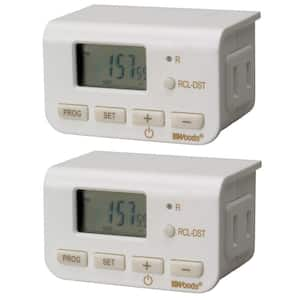
10 Amp Indoor Plug-In Daily Lamp Slim Fit Simple Set Single-Outlet Digital Timer, White (2-Pack)
The Woods 50007 Indoor Digital 24-Hour Slim Fit Timer automatically turns lamps, fans, holiday lights and other electrical devices on and off at programmed times. This digital timer is easy to set with a 4-button program and a great way to realize some energy savings. With a 2 pack of timers, use one for each outlet and maximize your indoor holiday and lighting needs. The slim design does not block the open outlet and two timers can fit one receptacle. Features include a large easy-to-read LCD screen, simple push-button programming and warm neutral color pallet to match today's home interior. The Woods 50007 Indoor Digital Daily Lamp Timer turns your lights on and off twice per day and save energy with daily (repeatable) settings. During power outages this timer retains its settings with a self-charging battery backup. This timer is compatible with compact fluorescent lighting, LED bulbs and CSA certified for quality assurance.
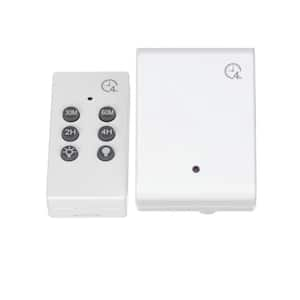
8-Amp 4-Hour Indoor Plug-In Wireless Remote Countdown Control Timer, White
The Woods 59781 indoor wireless remote turns lights on and off from up to 80 ft. away. Operate home appliances from across the room or another area of your house, using a remote control. The countdown setting turns connected device off after 30-minutes, 1, 2 or 4-hours as selected. The countdown feature is great for automatically turning the bedroom lights off after you've drifted to sleep. And the easy to use remote is ideal for anyone who just wants a one-touch, convenient way to turn lighting or appliances on and off. The Woods 59781 indoor wireless remote with countdown offers a fast, tool-free set-up and is easy to operate by the simple touch of a button. Use it to turn on lamps, activate holiday displays and operate electric fans and so much more. The Woods brand of timers and home controls bring simplicity to your life, by maximizing convenience, security and energy savings.

15 Amp 24-Hour Indoor Plug-In Heavy-Duty Mechanical Timer with 2-Grounded Outlets, White
Save energy, save money and feel secure with the Defiant 24-Hour Plug-In Heavy Duty Mechanical Timer. Effective with any electrical device, the timer turns your devices on and off with an easily programmable push of a pin. Just push down the pins (ensuring all pins are pulled up first), each representing a 30-minute interval, for the times you want your electrical device to stay on. The Defiant Timer is perfect for controlling lamps, seasonal lighting or deterring crime when you are away. For indoor use only.
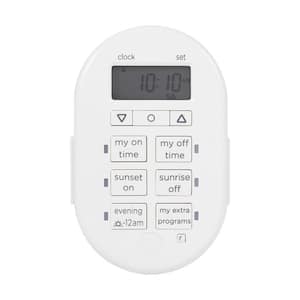
7-Day Programmable Indoor Plug-In Digital Timer
Save energy, save money and feel secure with the myTouchSmart In-Door Plug-In 7-Day SunSmart Dual Ground Digital Timer. This timer features blue LED indicators that show active programs and a large LCD screen for effortless viewing. These timers are compatible with CFL, LED, incandescent and halogen light sources.