- Schedules and automates outdoor watering to keep plants healthy
- Control water from anywhere using your smart phone
- Skips watering in the rain with Wi-Fi weather technology
- View More Details
Free & Easy Returns In Store or Online
Return this item within 90 days of purchase.
Ask about this product
Get an answer now with AI
AI-generated from the text of manufacturer documentation. To verify or get additional information, please contact The Home Depot customer service.
Product Details
About This Product
Easily create schedules and control outdoor faucets with the Rachio Gen 1 Smart Hose Timer and Rachio app. Program and run watering when you need it, right from your phone. Smart watering keeps your yard or garden watered and looking good while minimizing water waste. No need to be home to water or watch the weather -Rachio can automate your hose for worry-free watering.
Highlights
- Water your yard on-demand without a sprinkler system
- Wi-Fi connected and controlled from anywhere. Keep watering even if you lose connection
- Versatile programming for a variety of uses. Run water from the valve & adjust from your phone
- Skips when it rains, waters when it's hot, and informs you of freezes
- Ensures watering with verified flow detection
- Complete device history for trustworthy watering
- 2 AA Batteries required (not included)
- Return Policy
Product Information
Specifications
Product Width (in.): 2 in
Dimensions
Product Width (in.) | 2 in |
|---|
Details
Compatibility Type | Rain Sensor Compatible, Weather Station Compatible |
|---|---|
Features | No Additional Features |
Included | Garden Hose Connection |
Number of Zones | 1 |
Pack Size | 1 |
Power Options | Battery |
Power Source | Battery |
Program Type | Calendar Setting, Interval Setting, Odd/Even Day Program, Programmable, Rain Delay, Schedule Programming |
Requires Hub? | Item is a Hub or Smart Assistant |
Returnable | 90-Day |
Smart Home | Smart Home Enabled |
Smart Home Protocol | Wi-Fi |
Smart Technology | App Controlled, Smart Timer, Smart Watering, Wi-Fi |
Voice Control Hub Required | No Voice Control |
Works With | No additional compatibility |
Warranty / Certifications
Manufacturer Warranty | 2 Year |
|---|
Questions & Answers
Can I attach the timer, then a two way splitter off of it, then two hose's? Thanks.
Can the unit be 'hard wired' from the router or is it wifi only.
Once you've programmed the timer, will it continue to function if the WiFi internet connection is intermittent?
Yes. Rachio Smart Hose Timer will continue to function based on the last programmed schedule if it loses connection to the internet but intelligent features like Rain Skip will not work until it reconnects.
What kind of wifi does it require? 2.4 or 5.0?
The Rachio Smart Hose Timer Hub requires 2.4 GHz WiFi.
My hose bib has a very high water pressure. Will it work on that
We recommend between 10-100 PSI but the valve has been tested up to 200 PSI.
How noisy is the unit?
The valve is not very noisy. There there is a soft mechanical click when the valve opens and then there is not additional noise other than the running water until it closes.
It does make a soft audible click
I have read where a hub can control up to four valves. Could I control eight valves with two hubs or is the app not capable of managing more than one hub?
The Rachio app can manage more than one hub. You can control eight valves with two hubs.
How long does it take to set up the Richie 3 Smart Irrigation Control & Smart hose Wi-Fi hub
Setting up the Rachio 3 Smart Irrigation Controller and Smart Hose Wi-Fi Hub involves a few steps: 1. **Install the Rachio app:** Download and install the Rachio app on your smartphone or tablet. 2. **Create an account or log in:** If you're a new user, create a Rachio account. Existing users can log in with their credentials. 3. **Add the controller:** Follow the in-app instructions to add your Rachio 3 controller to your account. This typically involves connecting the controller to your home Wi-Fi network. 4. **Connect the Smart Hose Wi-Fi Hub:** The Smart Hose Wi-Fi Hub is included with the timer and requires pairing with the Rachio app. Refer to the provided instructions for the specific pairing process. 5. **Configure zones (for the controller):** If you're using the Rachio 3 controller, you'll need to configure your watering zones. This involves telling the controller what type of plants are in each zone, the type of sprinkler heads used, and the soil type. 6. **Set up watering schedules:** Once your zones are configured, you can create watering schedules. The Rachio app allows for flexible scheduling based on factors like weather conditions and plant type. You can also create manual watering schedules or use the app's smart watering features. The entire setup process, including configuring zones and schedules, typically takes around 30-60 minutes for the controller and approximately 15-20 minutes to add the Smart Hose Timer to the existing hub. The provided instructions offer detailed guidance for each step.
Viewing 1-8 of 13
Customer Reviews
3.7 out of 5
Loading Recommendations
Related Products
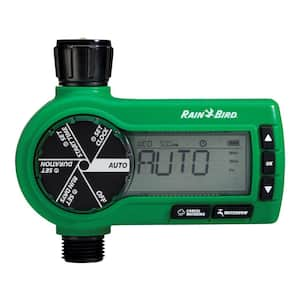
Electronic Hose Timer
Automate your hose-end sprinklers, drip Irrigation system or soaker hose for better scheduling consistency with this easy-to-use digital controller. Combining sophisticated programming flexibility along with extra rugged design. For season-long outdoor use, this versatile timer provides worry-free watering convenience.