#1 Home Improvement Retailer

Internet # 301328395

Model # RF23M8590SR

Store SKU # 1002433133

Store SO SKU #1002433133

Product Images

22.2 cu. Ft. Family Hub 4-Door French Door Polygon Handle Smart Refrigerator in Stainless Steel, Counter Depth

Apply Now
6 Months Everyday Financing** available on purchases of $299 or more. Apply Now
  • See inside refrigerator from anywhere with 3 built-in cameras
  • Customize Family Board: pictures, stickers, hand-written notes
  • Transition Spotify music from any mobile device to your fridge
  • View More Details

Ask about this product

Get an answer now with AI

Magic Apron Assistant is an AI virtual assistant. By proceeding, you consent to the recording and use of your information by The Home Depot (and authorized third parties). More information

Product Details

About This Product

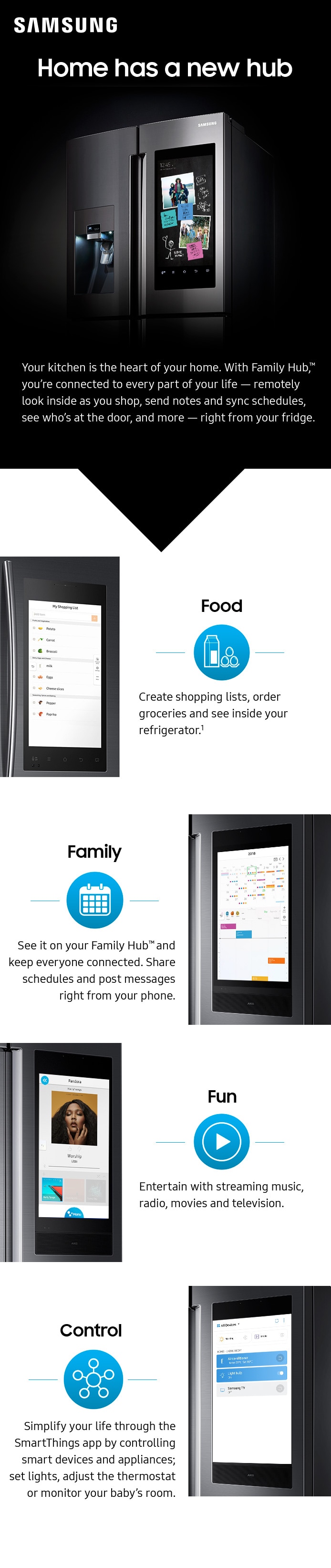
Samsung’s Family Hub refrigerator makes it easier to connect to what’s most important to you: your family and home, whenever and wherever. Family Hub lets you manage your family’s calendars, play music on Spotify, share pictures and stay connected right on your refrigerator. Now with Family Board, a digital bulletin board, you can customize pictures, add stickers and leave hand written notes for your family.

Highlights

  • Samsung SmartThings app allows you to control all your smart devices and appliances; set lights, adjust the thermostat or monitor your baby’s room
  • Create and share your shopping lists on your fridge or mobile device
  • Personalize your screen saver with your favorite photos, weather and animations
  • Stream music with Amazon Music, Pandora, iHeartRadio, Spotify Connect and TuneIn (radio)
  • See, hear and speak to anyone at the front door from your Family Hub with Ring Video Doorbell (sold separately)
  • Automatically assigns expiration notifications, based on items your cross off your shopping list
  • Sync calendars for family activities and events
  • Mirror your Samsung TV or Samsung phone full screen, directly on your Family Hub
  • Receive Wi-Fi updates so your fridge stays up-to-date with the latest features and apps
  • Intelligent voice assistant allows hands free navigation
  • Recognizes user’s voice and provides a personalized experience
  • Plan a meal based on what food is inside your refrigerator
  • Share photos and notes from your mobile device
  • Twin Cooling - Maintains both high levels of refrigerator humidity to keep perishable fruits and vegetables fresher longer, and dry freezer conditions means less freezer burn for better tasting frozen foods
  • High-efficiency LED lighting - brighter, cooler, and more energy-efficient
  • Fingerprint-resistant coating
  • Built In Look (Flat Panel)
  • 2016 ENERGY STAR Certified - Meets the strict 2016 energy efficiency specifications and standards
  • Compatible with water filter model: HAF-QINS
  • Click Here for details on the services included with Delivery & Basic Hook-up, Installation options for Major Appliances, and Appliance Return Policy Information
  • Click here to learn more about Eco Options and Energy Efficiency
  • Click here for more information on Electronic Recycling Programs
  • California residents
     see Prop 65 WARNINGS

Product Information

Internet # 301328395

Model # RF23M8590SR

Store SKU # 1002433133

Store SO SKU #1002433133

Specifications

Dimensions: H 70 in, W 35.75, D 30.5

Dimensions

Depth (Excluding Handles) (in.)

29.25 in

Depth (Including Handles) (in.)

30.5

Depth (Less Door) (in.)

24 in

Depth With Door Open 90 Degrees (in.)

43.1

Height to Top of Door Hinge (in.)

70

Height to Top of Refrigerator Case (in.)

68.875

Product Depth (in.)

30.5

Product Height (in.)

70 in

Product Width (in.)

35.75

Refrigerator Width (in.)

35.75

Details

Appliance Category

Refrigerator

Appliance Series

Samsung Family Hub

Appliance Type

French Door Refrigerator

Built-In and Standard Type

French Door

Color - Appliance Cabinet

Stainless

Color - Door Handle(s)

Stainless Steel

Color/Finish

Fingerprint Resistant Stainless Steel

Color/Finish Family

Stainless Steel

Defrost Type

Auto / Cycle

Door Finish

Smooth

Energy Consumption (kWh/year)

662

Energy Efficiency Tier Rating

Tier I

Freezer Capacity (cu. ft.)

6.6 cu ft

Freezer Door Type

Pull Out Drawer

Freezer Features

Adjustable Leveling Legs, Adjustable Temperature Control, Ice Maker, In-door Storage, Sliding-Bulk Storage Baskets

Freezer Type

Bottom Door Freezer

General Features

Child Lock, Door Alarm, Hidden Hinge, Interior Light, LED Light Type, Wheels

Hub Required

No hub connection available

Ice Maker Features

Automatic Ice Level Control/Shutoff, Control Lockout, Filtered Ice, Removable Basket

Ice/Water Dispenser

Both

Indoor/Outdoor

Indoor

Installation Depth

Counter Depth

Number of Doors

4 Door

Number of Drawers

Single Drawer

Operational Features

Automatic Shut-off, Deodorizer, Dual Evaporated Cooling System, Fresh Air Filter, Humidity Control, Humidity Controlled Crisper, Independent Refrigerator Cooling, LED Controls, Sabbath Mode, Self-Closing Door, Vibration-free Operation

Overall Product Height (in.)

70 in

Power Options

Hardwired

Product Weight (lb.)

354.94 lb

Refrigeration Dispenser Features

Crushed Ice, Cubed Ice, Dispenser Control Lock-Out, Dispenser Location-In Door, Filtration Replacement Indicator Light, Filtration System, Water Dispenser, Water Dispenser

Refrigerator Capacity (cu. ft.)

12.5 cu ft

Remote Access

Remote Access

Requires Hub?

No Hub Required

Returnable

Non-Returnable

Smart Home

Smart Home Enabled

Smart Home Protocol

Wi-Fi

Storage Features

Adjustable Door Storage, Deli Drawer, Gallon Door Storage, Removable Shelves, Slide-Out Fresh Food Shelves, Spill Proof Shelves, Tilt Pocket Door Bins

Temperature Control Type

Internal Digital

Total Capacity (cu. ft.)

22.2 cu ft

Voice Control Hub Required

No Voice Control

Water Filter Replacement Model#

HAF-CIN/EXP

Works With

Proprietary App

Warranty / Certifications

Manufacturer Warranty

Five (5) years Parts and Labor on sealed Refrigeration system only* Ten (10) years Part and Five (5) years Labor on Digital Inverter Compressor (*Compressor, evaporator, condenser, drier, connecting tubing)

Questions & Answers

Does this come in a white color?
ByMay 23, 2020
3 Answers | 
Answer This Question

I've not seen this model avialable in white.

By|May 25, 2020

No, it does not come in white color.

By|May 26, 2020

    No this does not come in white, Fergie. ^Lo

    By|May 25, 2020


      Does this fridge have 3.0 firmware or is it still on 2.0? It is a 2017 model, I would hope its r...
      ByOct 8, 2019
      1 Answer | 
      Answer This Question

      Mine is Tizen 4.0

      By|Oct 14, 2019


      Do the doors come off easily to fit through a door way?
      ByMay 18, 2019
      2 Answers | 
      Answer This Question

      Jp, here is instructions from the user manual starting on page 20 on removing the doors (https://bit.ly/2Fisilf). Thank you for choosing Samsung! ^Lena

      By|Oct 8, 2019

        Yes they do come off, most delivery companies have the method down to do this quickly. As a home owner its not too hard with the proper tools and knowledge, read the warranty to be sure it can be done by homeowner without losing any warranty privileges.

        By|May 18, 2019


        Is this a 2018 model?
        ByJul 2, 2018
        3 Answers | 
        Answer This Question

        Hi Rndoil, No, the Samsung RF23M8590SR/AA Refrigerator is a 2017 model. ^Joan

        By|Apr 13, 2020

          (1)

          You need to call customer service or visit the appliance dept, Im sure by now these are units with the 3.0 Hub the only real change for 2018. Not knowing if this is coming nfromm Samsung or Home Depot inventory its hard to say the model year. FYI if your an IOS user (Iphone Apple) your buying a very expensive unit that is really limited in the funtions of of the Hub. the refrigerator is nice though.

          By|May 5, 2023

          (1)

          This is a 2016 model.

          By|May 5, 2023

            (1)

            Is this a 2018 model? Does it have Hub 3.0?
            ByJul 2, 2018
            2 Answers | 
            Answer This Question

            You need to call customer service or visit the appliance dept, Im sure by now these are units with the 3.0 Hub the only real change for 2018. Not knowing if this is coming nfromm Samsung or Home Depot inventory its hard to say the model year. FYI if your an IOS user (Iphone Apple) your buying a very expensive unit that is really limited in the funtions of of the Hub. the refrigerator is nice though.

            By|May 5, 2023

            (1)

            Hi MichaelM, This Refrigerator is a 2017 Model and, it comes with the Family Hub 2.0, as soon as you connect to the Wi-Fi it will ask you to update to the 3.0 version. ^Joan

            By|May 5, 2023

              (1)

              can i purchase this refrigerator in the U.S. and have it delivered to one of your locations in Tijuana, Mexico for retrieval? I don't think this model is offered down here.
              ByFeb 18, 2018
              2 Answers | 
              Answer This Question

              Dear Valued The Home Depot Client, To better assist you with this issue, please contact the Home Depot customer service department at 800 466-3337. Call us any time from 6:00 a.m to 2:00 a.m EST. They can either answer your question or transfer you to your local store to answer your specific questions. Ticket number: 1144597991 ^Rainly

              By|Jun 14, 2022

                Hello ExPat, glad to help answer your question. Sorry No. Hopefully this helped.

                By|May 5, 2023


                What is Polygon Handle?
                ByNov 9, 2017
                1 Answer | 
                Answer This Question

                It is just the shape of the handle.

                By|May 5, 2023


                  What is the difference between this model and the RF23M8570SG? The specs and pictures look the sa...
                  ByNov 9, 2017
                  3 Answers | 
                  Answer This Question

                  this one is metal cooling

                  By|May 5, 2023

                    There no difference. The only difference is the special polygon and recessed handles that come with the expensive one which make it look for modern and better. I also liked the one without the handles but then I thought about my kids and guest having to pull the door from the bottom and maybe leaving fingerprint smudges. So I decided to go with sleek door handle look to make it easier for my kids to open and trust me it looks excellent. I love the fridge.

                    By|Jul 8, 2019

                      (1)

                      The finish and handle styles are different between the models.

                      By|May 5, 2023


                        Viewing 1-8 of 11

                        Customer Reviews

                        3.9 out of 5

                        • 3.9 out of 47 reviews
                        • 58% recommend this product
                        Filter by:
                        Showing 1-10 of 47 reviews
                        Poor Product Performance
                        after two purchases and to major problems. 1) icemaker and 2) family hub motherboard. i wouldn't recommend nor buy the product.
                        by
                        Response from Samsung CaresAug 27, 2019
                        You are a valued member of the Samsung family and your experience matters to us. Samsung is continually improving its products and services, and your feedback is vital to that process. Thank you for being a Samsung customer! ^Cat
                          I received the fridge on May 30th. So far is has been working great. I have not had any problems ...
                          I received the fridge on May 30th. So far is has been working great. I have not had any problems with it. I was able to connect to the apps very well because I have a Samsung phone/account. I am able to connect to apps from my phone and I am able to see what's inside my fridge from my phone when I go shopping. I can acces several apps on the fridge and they work well. My kids love to draw and leave notes on the tablet and I can see it from my phone away from home. The exterior look of the fridge looks awesome. It looks very fancy and modern. The black stainless steel look is excellent. I love the special handles I ordered, a bit expensive but it looks great. Everyone loves the look of the fridge. The fridge is not roomy and there is not enough storage space. I don't keep a lot food stored in the fridge so it works well for now. But if you like to store a lot of food this fridge is not roomy. Anything tall like a milk gallon has to stored in the door shelve, like orange juice and etc. You can only store short items on the shelves like coke cans but anything taller has to be placed at the door. There is not a lot room or space for a lot of things. It is more compact. The shipping/delivery is bad. They only deliver on one particular day of the week (Thursday) and you have to be available that day or they will not deliver the item and take it back. Overall everything has been working great, ice maker, water dispenser, the water pitcher, and all the apps on the tablet.
                          by
                          Response from SamsungFeb 3, 2021
                          Samsung is pleased to hear that you are enjoying your new Family Hub. A peace of mind knowing that your refrigerator is helping to keep up with the technology is priceless for the on-the-go lifestyle we all have nowadays. Welcome to the Samsung family experience! ^Shifa Samsung
                          • Verified Purchase
                          • Recommended
                          2 found this review helpful
                          Upon moving into our new home last month we purchased this refrigerator and it has quickly become...
                          Upon moving into our new home last month we purchased this refrigerator and it has quickly become the talk of the neighborhood! We love the Family Hub (as do our neighbors!!) and we use it constantly. The refrigerator itself is virtually fingerprint free, but if I had to say one negative (and I imagine there would be no remedy for it) the screen is large and always has a lot of fingerprints on it (much like an iPhone) since we use it so much. Everything else about the refrigerator, and all of it’s features, we love and we highly recommend it!
                          by
                          • Verified Purchase
                          • Recommended
                          This review is for Samsung 4 door family hub counter depth refrigerator. To begin with installa...
                          This review is for Samsung 4 door family hub counter depth refrigerator. To begin with installation, it was done by the professionals and took about an hour. They installed pretty quickly and even moved our older 4 door Samsung refrigerator to another spot. All I had to do was to take out plastic sheets and other stickers. The stainless steel finish with no smudge looks very rich and durable. The counter depth refrigerator gives me more space in my kitchen (although cuts down refrigerator capacity). The handles and door are pretty heavy and solidly built. I can tell you that because I own another Samsung fridge and you can feel the difference. The refrigerator has 4 doors- 2 for the main refrigerator compartment. 1 for flex zone. 1 for freezer. One of the main door can hold milk gallons and some other. The other door has a very nice pitcher that fills automatically with water and can be used to infuse your drinks with lemon or tea etc. the shelves are sturdy and can be adjusted a bit. The flex zone temperature can also be controlled. I am using it to keep things like yogurt in there. There is a metal separator that you can use to divide this section of space but I am not using it at all and feel that it's an overhead. There should be an option to remove this altogether. The freezer section has 2 sections one on top of each other. They also give you a small tray that you can use to put ice if need be. Now coming to the family hub. The screen is just big and awesome. The Samsung Tizen software is mostly responsive. You can connect the refrigerator to the wifi and then control some of the settings using Samsung app. The app, however, is very primitive, and can definitely use some polishing. I am not reviewing the app at this moment. The refrigerator comes with inbuilt cameras that show you what's inside and you can see that from your app too. However, the cameras are not wide angle and you can't see all things. Also, you can't see anything that's on the refrigerator doors. You can however add items that you see on camera to "instacart" or shopping list. Though I haven't done it myself. The feature is nice but not practical at this time. The family hub has some basic apps like pandora, grubhub, instacart, tune in and a browser. I have used browser to go to YouTube also and it works ( though onscreen picture quality isn't that great). I have put some family pictures and have set it as screensaver which is nice. The refrigerator also has couple of speakers that are not great but they are functional and can be loud too. Samsung Bixby (voice assistant) does disappoint. Overall the refrigerator is a good solid one but with a few design elements that, if changed, can make it a good investment. I do recommend it.
                          by
                          1 found this review helpful
                          Technology has taken over!! Aside from cooking, and there is an app for that this fridge does ama...
                          Technology has taken over!! Aside from cooking, and there is an app for that this fridge does amazing things. The fridge has so many features it’s hard to figure out where to start. First, lets break down the fridge into three compartments. The first being the freezer. Now I live in a house where there is five of us, and our three kids love to eat, so freezer space is crucial. The freezer has two bins on the bottom which hold a tremendous amount of food. I like to compartmentalize meat on one side and sides and vegetables on the other. On top of the bins and a draw that pulls out. Here you can store additional foods or in our case ice cream. There is also a container that can hold extra ice if you needed it for a party or cooler. We are currently using the container to store ice packs since we are not in need of additional ice, but it is nice to have the option if needed. Next is the middle drawer. This drawer’s temperature setting can be adjusted to meet the needs of the foods or beverages that you are storing in it. We currently use this drawer to store cold cuts and cheeses, but the temperature settings also include wine and meat. In the drawer, there is a flexible wire which allows you to organize and put larger items in the draw and keep everything neat. Finally the fridge. The refrigerator compartment has French doors for easy access to the inside. Inside there are adjustable shelves and one shelf that allows you to slide a section back to store taller items like milk and soda. Additionally, there are two clear drawers for fruits and vegetables as well as access to the water filter for easy changes. On the doors, there are multiple shelves for storing condiments and other smaller items. One of the nicer features is that there is a built in water pitcher on the left door that can be set to autofill and also has a built in infuser to put lemon or cucumber or whatever else you want to flavor the water. I know that there is water on the door, but that is not always super cold, having the pitcher ensures that ice cold water is always available. Now for the technology and what sets this refrigerator from others on the market. I love this feature as an avid tech person myself. There are so many interesting things that can be done with the built in tablet on the door. From streaming from my Samsung TV to ordering dinner and having it delivered to listening to music or placing your grocery order. I do find the features I use the most are: - Pandora (there are speaker built into the door that allows the sound to project through the room) - App –Allrecipe.com (there is a featured recipe of the day, and you can go in search for anything from breakfast to dinner and everything in between) - App – Grubhub (we’ve ordered dinner a couple of times directly from here, and you have the option of paying for your meal as well before you even pick it up) - Weather App – - Calendar and Picture App (there’s an app on your phone that allows you to control some of this feature which makes these two functions easier to access. You have the ability to upload photos right from your phone to the fridge and add events to the calendar). Another interesting feature is that there are 3 cameras located on the left door that allow you to view the inside of the refrigerator from either the tablet on the outside or from the mobile app. Could be useful if you are at the store and are not sure if you have something, a quick peek inside will take care of that for you Overall I have been thoroughly impressed with this refrigerator. It makes an impressive statement when you walk into my kitchen, and the kids had to take a week for the initial shock of wanting to touch the screen to wear off, but the fridge has come part of the family. My only complaint would be that it is not fingerprint resistant and my wife is always wiping it down, and the front is not magnetic although the sides are. We have one side exposed, so we still have the ability to use magnets to hang our kid's great artwork and projects.
                          by
                          • Recommended
                          3 found this review helpful
                          Need Samsung Phone?
                          What a great refrigerator! It is stunningly beautiful. It is the talk of the kitchen. Everyone who sees it, asks about it. It has numerous shelving and storage options. It is really quiet. When I first turned it on, I repeatedly opened the door to see if it was running. It is super energy efficient and the interior is bright, with its well placed LED's. Its one year energy use is estimated at 662kWh, which is the equivalent of a 75W bulb. I would highly recommend this refrigerator. The Family Hub 2.0 is a clutter preventer. No more need for refrigerator magnets. It has an easy to use format, and walks you through the set up (see pic). It has plenty of customizable options and 'cool' features. It has a programmable screen saver that is a digital clock (see pic), or time & weather (see pic [which is my choice]), or a picture gallery, and has a motion sensor to turn on the screen. I really wish the motion sensor was more sensitive. So, if I walked in the room at night, it would light the room and tell me time and weather. 99% of the time, I had already opened the door before it turned on, and then its wasting energy lighting up the wall (I have turned the motion sensor off). The other feature that needs tweaking are the cameras. They do not show what is in the doors, drawers or freezers (which I knew beforehand). What I did not know, the doors shelves block the view of the shelves. You basically only see what is in the middle of each self (see pics). You think you are out of tartar sauce, but open the door, and it is in there. My solution was to removed the door shelves. If I need the space, will put them back in, and stock accordingly. As for Bixby ... She is like an old dog. She ignores me, only listens when I yell, and does not understand me most of the time. I would put her to sleep (mic off), but she does light up when I yell, and since the motion detector is useless, at least I can get the screen on by yelling at her. Problem is, my real dog (who does listen) does not understand why I am yelling in the kitchen. May turn her off, until she is better trained? I assume Family Hub works flawlessly with Samsung products ... but it is not optimal with other brands. There is a feature to let you mirror your TV. So, when you are watching the big game and go get a beer, you do not miss anything ... but it only mirrors 'some' Samsung TV's. I tried to use my iPhone with the Easy Connection. It directs you to download the Smart Home app and follow the directions. I downloaded the app to my iPhone (can not find an app for my iPad). I tried to Connect my iPhone, and all I get is "Connecting to the network ..." (see pic), and it 'freezes'. The reviews of the app at the Apple Store are all 1 star. So, I know it is not just me. Since I could not get my phone to work, I went to Samsung's website to register the refrigerator. It tells you to take a pic of the UPC. I pull the fridge out, and take the pic. The website refuses the pic. I pull it out again and take another. The website refuses it also. After 30 minutes of trying, I just manually type in the model and serial number. I love how time saving technology wastes so much time ... LOL Bottom line: It is a 5 Stars refrigerator, plus another for a conversation piece. As for Family Hub / Smart Home, with the right Samsung TV and Galaxy 8 phone, it might be 5 Star too, but without it, I give it 3 Stars. If the secret sauce to make it work seamlessly is a Samsung phone, they really should include one with the purchase. P.S. As even a better conversation piece ... get the model with no handles. It opens just as easily (there are grips underneath the door), and guests will have to ask you how to open it. Except for the handles, the models seem to be exactly the same. The few hundred dollars you save ... you can use to buy a Galaxy 8 and truly have a 5 Star experience!!!
                          by
                          • Recommended
                          4 found this review helpful
                          All that!
                          Samsung Refrigerator Counter Depth with Screen. This Counter Depth Refrigerator in stainless steel is very appealing clean lines for a modern look. With the addition of the large touch screen you have entered into a high tech appliance. Starting with the Refrigerator the lines are straight and sharp along with the upper door handles. The bottom drawers have indented slots for pulling open the drawers. The top doors work very nice feel solid opening and closing . Bottom drawers are a bit flimsy they seem to rack a little if your not pulling directly in the middle of the drawer, closing no issues . Wish they would have put a handle on the drawers I think they would have a much better feel . With both drawers having a channel that might collect things and are not easy to clean. The ice maker is a big improvement over past models . Larger indenture for filling station , removable stainless bottom plate, better ice delivery and no leak on the water distribution. Our last Samsung always leaked after getting water. After several customer service calls we just lived with it . The water is filtered with a built in replaceable filter. Water tastes ok not a well as our old unit . Note that you need to flush the filter with many gallons before consumption. The ice maker takes up some room inside which seems to be common in Refrigerators today . One big plus for us is there is a built in water pitcher inside the door . What I really like is after you use it and re -insert back into its slot it fills back up automatically. It also has a infusion tube in the middle if you want to flavor your water. Now that we're inside It's finished with stainless back wall and main shelf above the crisper drawers. Glass shelves , one which slides to accommodate larger items and acrylic doors slots etc. This being a counter Depth unit be aware your giving up lots of space. Something it took getting used to, it takes a while to get it organized . Our previous Samsung was also counter Depth same size but I think it had more room in it . The crisper drawers are small and again the pull slot is now at the bottom of the drawer . It also would be nice to be able to pull them out further to be able to see what you have in there . There are also no controls for humidity like our old unit. The shelves work well and look great everything is easy to clean. This unit also has a refrigerator drawer with separate temperature control , stainless steel floor with a slide rack for separations . The slider is also improved from last years model with a locking mechanism. The temperature control has moved from the drawer to the front door screen , more on that in the screen review. Moving down to the freezer drawer it's your typical Upper slide drawer and larger bottom drawer. Lots of stacking if you freeze allot. One thing we noticed is a small inner drawer rack missing from our previous unit. The lighting is awesome in all the compartments. One of the things that jumps out is the doors are very thick . I'm guessing this was to accommodate the touch screen . Thought maybe giving up some valuable interior space . Fitting a plastic gallon of milk its not really possible in the door with out really forcing it in. The slidable shelf again the gallon hits the back and just fits on the shelf without the door hitting the container . All in all it's about lifestyle , shopping habits and figuring out how to organize inside the box. For two people this box works pretty good for us as we shop often for the freshest foods, don't really use the freezer other than ice cream or for quick cooling beverages. The freezer is capable though. The performance works well along with its much quieter then our old model of 1 year and cycles less. The inside zones keep set temperatures, the refrigerator drawer is a little sporadic not getting as cold as desired but it does keep a steady temperature. Our kitchen is very hot from sun exposure this new Samsung seems to kick on less then our old one . No power bill yet but buy putting a watt meter on both units measuring the consumption the new unit used less then the old . The old one being in the garage I think was a fair comparison . Maybe the thicker doors and smaller inside is traded for more or better installation. I guess the biggest power concern will be the usage of the front screen. Ok so now the LCD display Samsung Home App bells a whistles! Disclosure if your a IOS user forget about the Whistles we get just the Bells. Read on ! So first of all you don't need to Home App for basic use. You do need a wireless router though. No place to hard wire so this will use up bandwidth . Ok now the screen I.E. computer is the brains of the refrigerator this is the place you'll control the refrigerators temperatures get warnings etc. being a touch screen it's pretty nice though you do need to search around for things. With so many options you could spend hours messing around . Think of this like a extra large tablet , iPad etc. the home screen has a memo board, calendar , clock wall paper and some primary apps as I will call them to get you places in the computer. Also there are two sections one for recipes the other for entertainment. Here's where this might be a little evasive. The recipes is basically an app but changes randomly . I'm wondering how are you being tracked. Anyway think internet being at your finger tips on your refrigerator door. There are so many apps that can enhance your kitchen experience you just need to explore knowing you have the internet on the door of your refrigerator . There are also cameras to see inside by opening an app or remotely thru the Samsung Home App. Be advised it only sees what is visible from the front if you stack something behind it's not visible. No viewing in the freezer or cooling drawer. Over all lots of features but you need to explore the apps for what will work for you. Examples like tv mirror, net flix, pandora, shopping lists , recipes with shopping lists, remote views, shopping services. On and On the internet is your limits. So now the app. At present the Samsung app is available for both IOS and Android, however I'm a week in and still not able to connect with my IOS System iPad, iPhone or mac. So using all the cool functions Is fruitless. Several calls already knowing it doesn't work has not let me connect to a functional expatiation. Reading lots of forums it seems to be an issue or maybe a way to drive us IOS users to a Samsung system. I've also spoken with other home controllers Companies which they are not giving any promising news. So at this writing if your an IOS user you probably will not be able to take advantage of all the cool things possible with the Samsung Smart home app and this refrigerator. Hopefully this will be rectified with Samsung sooner then later. IOS users beware! So all in all the product is a good refrigerator , looks great , cool functions has lots of potential even if you don't use the App. Maybe my biggest concern is this, as with tablets , computers they seems the technology changes every day will the screen be obsolete in a year or two. Then you have a very expensive Refrigerator. I would hope to expect this Refrigerator to last at least 5 years but shouldn't be obsolete in ten years . Food for thought if you looking long term.
                          by
                          • Recommended
                          4 found this review helpful
                          Ice Maker Stinks
                          We have had this fridge for 4yrs now and couldn't be more disappointed. Had service work done on the ice maker 3 times. Never has worked properly. Freezes up, just terrible. Also, condenser is noisier than I would have ever expected. The change from the Family Hub app to the Smart Hub app was super disappointing as well. They dropped about a 1/4 of the functions, notably the "Note" app. Which I used frequently when traveling to send notes to my wife and kids.
                          by
                          Response from SEA CareNov 2, 2023
                          Rthender53, we know how frustrating it is to experience all this with your refrigerator. We're here to assist. Below is a link to help you diagnose why your ice maker is freezing. Please choose "Ice maker is frozen over." Kindly click on the embedded word. Ice maker not working https://www.samsung.com/us/support/troubleshooting/TSG01001012/#ice-bucket-is-stuck-or-has-a-block-of-ice If you hear a noise on your fridge, kindly refer to the provided link to aid in identifying the specific noise you are experiencing. Click and listen to the assortment of sounds, matching them to the one you are hearing. Afterward, please proceed with the troubleshooting instructions given. Also, watch the video included. Refrigerator noisy https://www.samsung.com/us/support/troubleshooting/TSG01001032/ Should you need more assistance, please feel free to get back to us via the following options: 1. Facebook Messenger: http://m.me/Samsungsupport 2. Twitter: https://twitter.com/messages/compose?recipient_id=18768513 3. Samsung Community: https://us.community.Samsung.com/t5/Samsung-Community/ct-p/us When you message us, please provide us with this reference number (1146477781) to help our team pull up your information. Have a great day. ^Camille
                            Avoid All Samsung Fridges
                            great fridge, horrible ice maker. nothing but problems and is out of warranty. constantly have to defrost with a hair dryer. gave up, now we just use bag ice for our guests. this is a problem for all samsung fridges. avoid!
                            by
                            Response from Samsung CareJul 20, 2021
                            I'm sorry to hear you are having problems with your ice maker. I'm not sure if you have already tried the troubleshooting steps for this issue. But, if you haven't; You can find it in the link here: https://bit.ly/3iyUIKl. If you have already tried the steps in the link above. I would recommend reaching out to your nearest service center by using the link below. Thank you. ^Pat https://www.samsung.com/us/support/service/locations/
                              Low my fridge
                              [This review was collected as part of a promotion.] I have had my new Fridge for 2 months. It is functional and beautiful!
                              by
                                • Recommended
                                Showing 1-10 of 47 reviews

                                What We Offer

                                Delivery

                                Services

                                We offer move or haul away services, and installation on most appliances when you purchase required parts.
                                Installation Requirements

                                The Home Depot

                                Protection Plan

                                Get 24/7 support and our 3-day Service Guarantee
                                Plan Coverage and Details

                                48-Hour

                                Return Policy

                                You can return your appliance for damages and defects within 48 hours.
                                Return Policy

                                Price Match

                                Guarantee

                                We will match prices including shipping of any other online competitor.
                                Learn More

                                Delivery and Installation

                                thumbnail

                                Home Depot Refrigerator Delivery & Installation

                                This video will walk you through the simple steps you must take in order to ensure a successful delivery and installation of your new Refrigerator from The Home Depot.

                                thumbnail

                                How To Measure For A New Refrigerator

                                Taking accurate measurements in your home is critical when purchasing a new refrigerator. Here are step by step instructions on how to do it correctly.

                                Please ensure the following prior to delivery:

                                • Water connection kit required
                                • 110V-grounded, 3-prong electrical outlet
                                • Water valve (shutoff) within 6 ft. of hook up
                                • Measure the delivery path and new appliance area to make sure that your refrigerator will fit perfectly
                                • Verify your existing electrical and water connections
                                • Empty & unplug your old refrigerator